Reviews related to : Web-cams
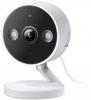
This web cam can be used both inside and outside. It is especially good at night when there is little light around. A near 3metre long USB 'C' to USB lead fits into the back of the unit and there is also a 13amp USB plug supplied so you need to be less than that distance from a 13amp plug.
The camera is round at 5.5cm and is 5cm from the back of the USB 'C' lead to the front. It has a stand attached to the base that can be used as such or extended vertically by 9.5cm and screws are provided should you wish to permanently fix it to a wall. The camera rotates manually should you need to aim the camera at a different direction. Alternately it can be used with a supplied magnetic base plate to any magnetic surface or stuck to a clean wall.
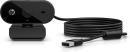
A lot of flat panels and even a few notebooks now come without a webcam, possibly as size matters more than communication so there is a place for an external webcam apart from its ability to have better resolution than most built in offerings.
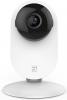
While working from home might mean you can provide your own security, when away you might need some assistance.
Since being founded in 2014, the San Jose, California company, YI has been involved in the development of Edge Computing and intelligent video technology. Recently the company has added its product line-up with the . I have had the opportunity to check out this device for home monitoring purposes. Adopting a slim-line type of appearance, the YI PRO camera's stand is predominately white in colour with a black bulbous lens protruding from the front of the stand.
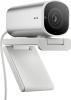
Some screens come without a webcam but there are times when one is required and indeed these may require better resolution so a 4K webcam has its place, this offering from HP is quite chunky and because of the higher resolution it needs to be connected via USB3.
This iHP 960 4K streaming webcam measures 11cm deep, 5cm wide with support and 6cm from base of folded support to top of camera. The only other items in the box are a 1.5metre USB ‘C’ to USB lead and a getting started sheet. Let’s start with the instructions they are one of those multi language sheets that say very little and expect the six illustrations to say everything.
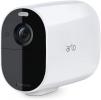
When the door bell rings, do you know who is calling? This next product could help.
Encased within a bulbous, lacquered white shell, the takes central stage in the kit. It comes with a mount unit that features a built-in articulated device that allows the angle at which the camera points to be adjusted through 90 degrees. A set of three screws and rawl plugs are provided for attaching the mount and camera to an outside location.
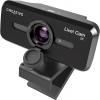
Not all laptops and notebooks come with a webcam and nowadays most screens for desktop do not have a webcam. So this latest offering from Creative Labs has a place. It also has an advantage that both the camera and the microphone use the same USB connection so no chance of a situation that I have come across previously of the microphone working and the camera not or even vice versa.
The Live Cam Sync V3 is small enough to fit easily in a bag, the box it comes in is only 11.5x7x10cm, the cameras actual dimensions are 8x3x3cm and it is attached to a small stand that increases the total height by only 2cm. The stand is designed to hang over the top of a screen it is 6cm long and the drop down balance arm is 4.5cm. Installation on Windows is very quick – less than 30 seconds – and it is immediately recognised on Zoom and other such products.
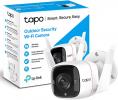
Having recently told you about a large outdoor camera that can be Wi-Fi or Ethernet here one that is a lot smaller but it still offers the choice of Wi-Fi or Ethernet but of course it weighs a lot less and has another very useful feature it’s a lot cheaper but still offers the same resolution of 2K.
The camera measures 5.5x5.5x7cm and its fixed mount can move it 7cm further out from whatever it is mounted on. Its hard wired lead can go through a wall or window frame up to 35cm from the camera. The mount allows a good area of coverage. At night you can set either monochrome or as an added help as deterrent full colour with the aid of the built in spotlight. You get a near instant notification of any movement being detected on your Smartphone.
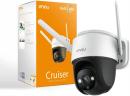
This is an outdoor camera, it is designed to be mounted on a ceiling or wall and hang downwards. Unlike a lot of small indoor cameras this is designed to be seen and therefore this can have the effect of deterring before intrusion happens.
The camera is 15cm from top to base disregarding the aerials and is round at the base at 11cm. It can be hung or attached from the supplied fitment. Everything you need to fit is supplied apart from a screwdriver and drill, they even supply a template.
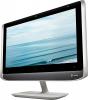
Recently I have told you about a small USB camera and a Bluetooth headset with far better than normal range. Here is a flat panel that has both built in and for good measure it has lights built in both sides to improve the view people get of you as it frames you better, this is certainly an all in one device for those Zoom calls. This is a real personal meeting display for those occasions when you cannot meet personally.
The screen and surround is 56cm wide and from top of the screen to the top of the stand is 37cm. The viewable screen itself is 48x26.5cm which gives the notional diagonal imperial measurement of 21½ inches. The stand clips into the rear of the screen it is 30x18cm and raises it by 8cm from your desk. The power lead enters the main body of the screen just above the stand. The total weight is less than 7KG.
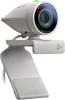
Plantronics is a name some will know as they produced headsets and Bluetooth earpieces for many years. Then there was another company that did things in larger office environment, just over two years ago the two companies’ combined to produce Poly. Like so many things then went on hold through Covid and now we see what they combined to produce.
This is a very small full HD video conferencing camera and microphone that is true ‘plug and play’ as it is USB, a few seconds after plugging it in you can join a Zoom – or any other type online meeting – by simply hanging the unit over the top of your monitor or notebook screen and plugging it in. The unit is 6cm from lens to its rear; at the front it is round at 3cm. It swivels on a fitment that give a firm but gentle hold.
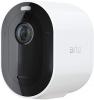
This is a battery controlled external camera with Siren and Floodlight and you have the choice of what it can detect, as an example ‘human only’ would be great in my area with the number of cats and foxes that roam around, if can save lots of false alarms that both you and your neighbour's will appreciate.
The Arlo Pro4 Spotlight Camera measures 7x4.5x8cm, the last figure the depth is to the back of the camera the mount can add around another 4cm to the depth. Like so many things today it is linked to your phone and indeed the setup of the unit is on your phone in the Arlo App.
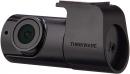
Offering to add visual capture facility to your car is a device from a company with strong Korean connections.
When thinking of automobile GPS navigation devices and dash cams, one company whose name does not immediately spring to mind is that of Thinkware. This is probably for the reason that Thinkware has concentrated its effort at developing its profile in the field of automobile accessories in Korea rather than the rest of the world.
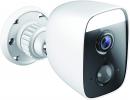
Most recent ‘outdoor’ cameras that have crossed my desk have been battery offerings that would require you to climb up to change the battery or recharge it. They of course require only fitting, this offering from D-Link is wired so it needs to go through either a wall window or door frame to get power and to deliver its signal to you.
It is 8.5x5.5x6.5cm the last figure the depth is increased by the bracket so could be as much as 12cm. The hard wired lead that emerges from the back of the bracket is 4.2 metres long ending in a round 1cm across fitment that carries both power and signal. There is a further plug/fitment on another 3 metre length of cable that ends in a power plug so however you link it you need power within three metres of entering your home. Also in the box is a ten side fold out Quick Start Guide.
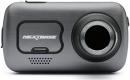
Accidents can happen and a Dash Cam can provide evidence to help protect the innocent party.
Nextbase, producer of the largest Dash Cam brand in the world and holding over 80%, by volume share, of the UK market, has added to its product range line up with the release of its 622GW model. This new offering comes with a range of features that the company feel will enhance the critical evidence gathering that can occur thus allowing the driver to concentrate on the main aspects of the driving experience.
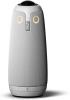
As you gather round the table in order to view and chat to others many miles away and this next product could help.
The arrival of this next product immediately caused a couple of flashbacks. The first of these involved the Amstrad company with its video telephone product. Unlike the earlier more basic offering of just vocal communication, this product allowed users to talk and view whoever they were communicating with at the time.
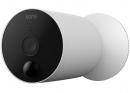
This is an outdoor (IP65 waterproofing) camera, it uses custom batteries that form more than half of the units overall size. Fitting can be done by anyone happy to climb a ladder and it should take only a few minutes but do not try to install it before you have linked it to your phone.
The KAMI Outdoor Wire Free Camera measures 13cm from front to back and the body is round at 6.5cm, it is heavier than most at 402grams. The majority of the weight is the four solid rechargeable batteries stated to last between 4 and 6 months between charging. These are each 6cm long and round at 1.5cm each of the four batteries weigh 46.5grams. The back 9cm of the housing unscrews to allow the batteries to fit into the centre of the unit.
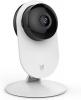
While hardly what you would call the ideal circumstances, the period of self-isolation has provided the type of situation that can help with the setting up and checking out of a home security device. By taking on the role of an intruder, you can see how the product works.
The home security device in question, and the subject of this review, is the YI Home 1080p camera. For the benefit of those readers who are perhaps not so familiar with YI Technology, to give the company its full title, is an organisation that has set out to provide enhanced safety and productivity on a worldwide basis for consumers and business users.
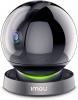
This is an indoor security camera, the colour option works in lower light than a lot of others and while easy to setup once you have decided what ‘password’ it wants you to enter to link, then it offers a great deal more options in the settings than almost any other such camera and for those who want them it can provide so many choices over the basics.
It is a round offering on a flat base 9x9x11cm the latter is with the supplied micro USB to USB lead inserted in the back of flat base. It can also be hung via screws and an attachment to the base. The camera rotates to any position so via a setting it can then follow whatever moves and another setting allows this to be human, to explain the last part this can stop it following your pet such as a cat and then avoid false positive notifications.
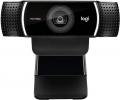
Web Cams until the recent CoronaVirus were something that sat in the top surround of a panel of your Notebook/Tablet, often people worried about being spied upon, recent panels I have seen now have no Web Cam. So hence the need for decent offerings like this one from Logitechh that can keep friends and family in touch.
I installed it on a not that recent Windows 10 system and that involved screwing the tripod base to the camera and plugging in the hard wired USB lead and saying yes a couple of times. So anyone can do it, this means a son or daughter can purchase this online and post to their parent so at least they can chat and see each other, thus keeping friends and family in touch during the current Pandemic.
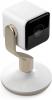
With a title of Hive View, the subject of this next review has to be a security camera that has been designed to keep you informed as to what is happening in the home when you are on your travels.
The Hive View security camera kit consists of the actual camera unit, various power plugs and connecting cable, screws, wall plugs plus mini User Guide and warranty document. . Deck out in white, the camera unit comes in three parts. These are the well-made camera unit, metallic base plate and stand unit. The various components can easily be slotted together for a free standing device or you could opt to have the camera wall-mounted using the supplied screws and wall plugs.




Main Menu


