Reviews related to : Networks

This is a range of small items that all do their jobs linked though a single Smart Hub. Apart from The Smart Hub I was sent three items a Motion Sensor, Temperature & Humidity Sensor and a Contact Sensor. You can then link extra such units so various door and windows are all covered so no chance of leaving with an open window. While the App is useful so is a in house sound and here both are available as the Smart Hub has a sound output.
Like so many things today you download an App to your phone and then you always know the conditions of the various items. Once downloaded select the model of your Smart Hub with Chime – it wants the part number in this case Tapo H100 found on the front of the box, setup an account and log in after this you just need to select any devices you have to connect to it. The Smart Hub is 7x4.5x3.
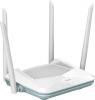
A router is not something we tend to change that often unless there is a reason. These days the coverage a router gives is either enough for your needs or it isn’t and then you get an extender of some sort. However I found out recently that there is a new updated version of Wi-Fi as those of you who read my recent Motorola SmartPhone review will perhaps give you a reason to upgrade.
The Eagle Pro AI AX1500 Smart Router R15 to give its full name seems to me to be a little long for a title. The main body of it is 20x13x4cm without anything plugged in, it has four aerials two on the back and one either side all move through 90 degrees from vertical to horizontal. There are four pin hole LED’s on the front, four Ethernet ports on the rear the yellow one goes to your modem and the other three allow you to connect things needing Ethernet.
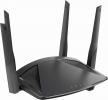
Offering a range of improvement in regards to performance and facilities, D-Link has released a new router.
Adding to its EXO AX Series of routers, D-Link has released the DIR-X1800 Wi-Fi 6 router. This product comes with the promise of delivering exceptional capacity, next generation speed and range, excellent efficiency, backwards compatible and has been designed for use in device-dense environments such as a smart home. I have been given the opportunity to check out the performance of this AX1800 Wi-Fi 6 router.
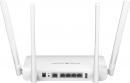
Sometimes there are things that you would like to view although there they are not immediately available because of where in the world you live. So a router that can be ‘elsewhere’ could be an advantage. This offering can help to achieve whatever you want it to, wherever you are in the world.
It is 14x21x3cm and out of this unit are four aerials that are each 19cm tall so the actual space taken may vary. The test unit I was sent comes with a UK plug on a one metre lead so power must be less that that away from where you set it up. There is also a 70cm Ethernet lead supplied. The router itself is not designed to stand and has a couple of holes in the back so it can be hung on a wall so not taking up valuable desk space as most routers do.

Normally writing this first paragraph is easy, it just explains very briefly what the item being reviewed is, be it software, hardware, something for the home, something for the office or even something for the children. This box connects to the Internet using your modem but it is not exactly a router, it’s really for the Internet of Things, any wiser?
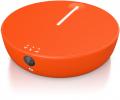
Mobile Wi-Fi in almost any country, this is what this small orange coloured unit promises. Like the majority of things today it is run from an iOS or Android App. Once the App is downloaded and the Solis is charged a couple of minutes for setup should have you connected anywhere.
While I cannot claim to have used this in the Scottish Highlands, the Sahara Desert or the middle of the Atlantic Ocean everywhere I did try it I got the ability to collect and send emails and browse the Internet, with a SIM inserted in your phone you can also send and receive phone calls and SMS messages, that last statement may seem strange of course you have a SIM in your phone but I deliberately set up a brand new phone so it never had my Wi-Fi information so it could not use it.
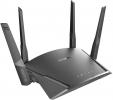
When playing games there is a wide virtual world out there accessible with an appropriate router.
Adding to an extensive catalogue of products, D-Link has released its Exo Smart Mesh WiFi Router series which offers a seamless connection solution to the home user. At its launch, this new series consisted of the AC1900 and the AC2600 Smart Mesh WiFi versions of the product.
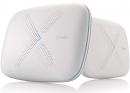
The Zyxel Multy WiFi system has been designed to provide enhanced wireless coverage over an area of up to 4,500 sq. ft.
Consisting of a Zyxel Multy X node and a Multy Mini to act as a satellite it provides wireless mesh coverage at both 2.4 and 5GHz with separate 5GHz channels being used to provide wireless “backhaul” communication between the two units. The node is roughly 9 x 7 x 2 inches thick and has all its connections on one of the long sides. It is white in colour so won’t look out of place in any home when it is sitting flat on a desk or hung on the wall.

Often a tall or wide building has problems receiving a Wi-Fi signal from a single point, one solution is power over Ethernet giving a connection to a loft or other far flung place but this could still cause problems with anything that is handheld as signals can be lost. Another possible solution is what I am looking at here Zyxel Multi U.
It works in a different way, one unit is connected to your router and can then connect to the next unit and even a third unit but if the signal is stronger from the third to the first it find this so the three units work together with all movements being transparent. For those who still need Ethernet each unit has the ability to connect via that, so not only can you roam around with a handheld device anything that is static can be connected via cable.
Some of us reside in an environment that could be best referred to as one that is based on the Internet of Things (IoT) with interactive devices everywhere.
As more IoT devices arrive and are added to the equation, we are being encouraged to hand over control of our living environment to objects whose prime concern seems to be their ability to interact and communicate with each other.
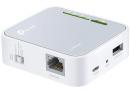
With 5 antennas and a slot for SIM card entry, this router caught my attention.
As a global provider of networking solutions and appropriate accessories, TP-Link has a large catalogue of offerings. I recently have had the opportunity to try out one of the company’s product. This offering is the AC750 Archer MR200. This product is a Wireless Dual Band 4G LTE Router and it is the subject matter of this review for Gadgetspeak.com.
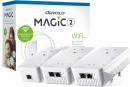
Power over Wi-Fi, range extenders and Wi-Fi Extenders are all ways to allow you to get a signal where you may not be able to do so normally, here an offering from Devolo called Magic 2 to allow places that otherwise would need a carrier pigeon to get information in or out help to allow you to stay in touch. Be it loft or basement you can now have connection.
The Devolo Magic 2 Whole Home Wi-Fi Kit consists of three units which each connect to a mains outlet. First the master that needs to be placed near your Modem it is 13x6.5x5cm and has an Ethernet port on the top of the unit and a 13amp plug on the face so whatever was in that socket before you plugged in the Devolo Magic LAN can still be inserted without affecting the Devolo.
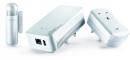
When turning your home into a Smart environment, a Home Control Starter Pack, such as the product developed by Devolo, could be an appropriate route to take when enhancing certain features
As its title suggests, the Devolo Home Control Starter Pack offers to be your opening gambit when building a Smart Home environment. This Starter Pack consists of three main elements. These are the Central Unit, Smart Metering Plug and a two-piece Door / Window Contact unit.
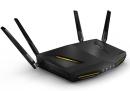
Looking to add some extra power to a home network you might want to consider the Armor Z2.
While maybe not having the high profile and public acceptance of some other companies, ZyXEL has regularly produced some impressive products. One of these is the Armor Z2 offering. This is a dual-band 802.11ac wireless router. Although targeted specific at the gaming fraternity, this product can also provide useful facilities for those who do not regularly immerse themselves in the all-enveloping environment of modern gaming.
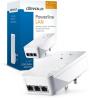
Where Wi-Fi cannot reach there is an alternative to a very long Ethernet lead and that is using power sockets to transfer the signals. Providing the router and the external point are on the same ring main you can get a strong signal it could be your basement, loft or garage.
I was sent a single box that contains two Powerline Adapters it is called a starter kit and this contains all you need to get that out of Wi-Fi spot back into use. The kit has two adapters the one to connect to your router is slightly larger at 14x7x6cm and this has three Ethernet Gigabit ports on the top, the other smaller unit is 13x6.5x5cm and has one Ethernet port on the top.
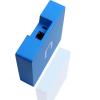
Over time descriptive terms can come to have different meanings. I am thinking in particular of “smart home”. While my parents would have taken “smart home” to mean a place that was neat and tidy without needing any decorating, you and I, as member of the current generation, would use the term when describing the plethora of interlinked devices within the modern home.
In some cases a modern “smart home” could be regarded as a one-stop shop with all the various elements belonging to a single brand but this is not always possible. For a variety of reasons, some users opt to mix devices from different brands which can cause communication problems. Offering to help ease any communication issues between devices of different pedigrees is the UK developed nCube product.

Just how smart is smart? Your home may contain any number of devices that claim to be smart but do you really trust them to respond in an appropriate manner when they receive instructions, especially when the instructions emanate remotely from an outside source not under your control. It could happen.
The current big topic, referred to as IoT or Internet of Things, is for all your household goods, whether fridges, kettles, lights and even air purifiers, are all interconnected and remotely accessible via the Internet and a mobile device.
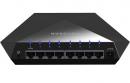
This item from Netgear even looks sinister as you remove it from the black box that this switch comes in. The matt black finish and the areas made up of triangles and rectangles add to the illusion that this device is somehow not a friendly one, add to that the dark blue ‘V’ of LED light when switched on it becomes more menacing.
It is 19.5x14.5x3.7cm before anything is plugged in to the rear of it, so add another 3cm to the middle figure the depth. It weighs 765grams main because the case is Zinc-Alloy. The base has four small 1.5x1cm rubber feet to make sure it stays flat on your table or desk and it has to be used in this way as unlike some routers it is only stable in this formation.
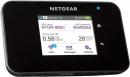
Carrying a WiFi hotspot is your pocket is made possible by this next device.
A saying, probably more relevant now that during my youth, stated that you could never find a policeman when you wanted one. Nowadays you could probably say the same thing about Wi-Fi hotspots unless you wanted a cup of coffee. Fortunately, while carrying a police officer in your pocket is not really possible, a mobile hotspot could be a distinct possibility.
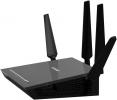
The NETGEAR Nighthawk X4S is an AC2600 Smart WiFi router. I have been looking at the latest R7800 model of this particular device. It offers the user quad-stream X4S architecture for use with advanced gaming and streaming features on your LAN.
Following the standard NETGEAR plinth shaped appearance, combining a plastic matte black base with a dark grey top, the Nighthawk X4S has dimensions of 285 x 185 x 50 mm (W x D x H). To gain the full benefit of this router you will need to attach the provided four antennas. These antennas can be screwed into sockets that are positioned on either side of the unit and along the rear of the router.




Main Menu


