Reviews by category
Brother DCP-350C

Buy Now...

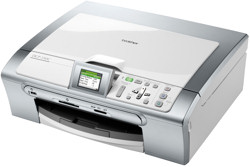
This product brings together the capability to print, scan and copy documents from a single item of kit with the aid of a colour LCD feature. Combining matt silver and creamy white colours with a rectangular box shape, the DCP-350C has an attractive appearance that would not look out of place in a small office or home environment. As is standard practice, the design of this multifunction device has a flatbed scanner mounted on top of the inkjet printer unit with the whole thing measuring 398 x 360 x 150mm (W x D x H).
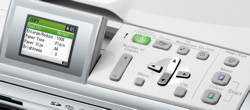
Following Brother's normal policy, the USB connection is located within the body of the device while the four inkjet cartridges (black, yellow, magenta and cyan) slot into a conveniently positioned front-mounted compartment. Running across the top of the device, alongside the scanner lid, is the unit's control panel and a 2-inch colour LCD which provides status and feedback information. The LCD screen can be adjusted to various angles for easier readability. The various buttons making up the control panel allow you to enter settings; select a colour or monochrome option; plus access ink management features. There is also a button to turn the device on/off - a necessity as Brother has neglected to include a shut-down mode after a period of inactivity or automatic power up following a request from the computer.


Finally there is a button to activate the PhotoCapture Centre whereby you can view and edit content from a memory card. This feature can also be accessed by inserting one of the support memory card formats which include SD, CD and xD. The appropriate memory card slots plus a PictBridge feature can be found running across the front of the unit.
Paper input and output are both located at the front of the DCP-350C. The paper input tray can hold up to 100 sheets with support for most common sizes, envelopes and card up to 220g/m². If a paper jam occurs, and this did happen on occasions during the review period, then the blockage needs to be cleared from the rear of the unit.
Included with this multifunction device is a software CD containing documentation in PDF format, drivers and a number of utilities. At the heart of the provided software is the MFL-Pro Suite which consists of tools to scan and copy item using a computer. You can copy items direct from the DCP-350C without the need of a computer. Also included are OCR and document management PaperPort software.
The DCP-350C is rated at 30ppm monochrome and 25ppm colour. I was able to achieved similar figures when using the Fast Print mode. It must be said that the print quality using this mode was only suitable for draft documents. You would need to switch to Fast/Normal,
Copying a full A4 document took 36 seconds in monochrome and 40 seconds in colour using the
The DCP-350C bears a price tag of £79.99. Replacement inkjet cartridges will cost £17.61 for black, giving approximately 500 A4 pages, and £9.98 for each of the three colours, giving approximately 400 A4 pages @ 5% coverage. I am at a loss to explain the differential between the pricing for black and colour cartridges - surely 100 pages should not make that much difference.
http://www.brother.co.uk/g3.cfm/s_page/50670/s_level/31190/s_product/DCP350CU1
| add to del.icio.us | Digg this review |
| StumbleUpon | |
 !!
!!






Comment by John Johnson, 18 Aug 2011 17:38