Reviews by category
HP Photosmart C7180




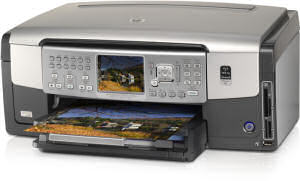
First the all important dimensions it is 44x34x18cm rather different than what is stated in the HP link, mine include the inserted power lead. All the controls are in a panel in the centre of the face with the exception of the on/off switch that for some reason is at the bottom left of the front.
This is certainly not a device to be operated from above as the TFT screen seems to be fixed and slightly tilted down so while it needs you to be more or less in front slightly below is fine but the same amount above means you having to bend. However it can be tilted up to around 40 degrees. It is a six ink six cartridge offering with good sized ink tanks.


There are a total of forty buttons on the fascia but when operating from a PC the only one you need is the forty first the on/off switch.
The paper tray is in the base and while it is stated to hold 100 sheets I could not get close to this. Above the main tray is the photo tray stated to hold up to 20 sheets (I managed 10) of up to 18x13cm paper or course it is also quite happy with 15x10cm. Above this is the output shelf, stated to hold fifty sheets I got twitchy at twenty.
To the right of the on/off switch on the right edge are four card slots and below these is a Pict-Bridge socket. This also supports pen/stick drives with images something that a lot of Pict-Bridge sockets do not.
The unit comes with a range of HP software including OCR and a copy of Photosmart Premium. The MFU itself has a copy of Photosmart Express to allow you to do basic things when not connected to the PC.
When printing from the PC a normal text page prints at 20ppm (this is the 200 word document) while a more normal 1500 word offering prints at 14ppm. Even though this is fast draft the output is black and crisp.
Printing on photo paper I found that in best mode (what else would you use for photos) took around 285 seconds for an A4 borderless page and almost exactly the same time for four near 15x10cm printed on a single page. Printing a 15x10cm image from the photo tray took just on 40secs. I will leave you to look at the claimed speeds.
The scans it produces are fine, the OCR quality is also fine providing the original is of good quality, if the page is folded or scrunched up then you run the risk of having to do some manual editing. The standard of OCR products has greatly improved and you really should be expecting only around one character error in one hundred. However you should always check the output.
You can of course copy pages direct while the PC is turned off or not connected. I own a black/white Canon copier that I have not used for some time mainly because I am normally reviewing a MFU/AIO device and of course these give not only black/white but also colour output. Here a colour A4 page takes 45 seconds and a black/white one 30 seconds. While you do have some capabilities to reduce/enlarge copying direct it is a lot easier and there are more 'bells and whistles' easily assessable from one screen within Windows.
As far as Fax is concerned I am told by printer manufacturers that businesses still require it so this machine has it.
Doing my Internet searches found the HP Photosmart C7180 at a best price of £229.99, including delivery from the first link below.
http://www.pcworld.co.uk/martprd/product/seo/389715?source_id=aw&camp_id=GadgetSpeak
| add to del.icio.us | Digg this review |
| StumbleUpon | |
 !!
!!






Comment by BrianHolmes, 14 Dec 2008 19:21