Reviews related to : Microsoft
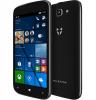
While the Windows phone seems for many manufacturers to be not the path to take with iOS and Android the winners left to slug it out between themselves in business we are told there is still a sector that needs/requires Windows phones.
A dark blue box contains the phone, a micro USB charge cable and a card with instructions on how to fit the supplied 2100mAh battery. As this phone is sold for business use you will probably already have a Microsoft account if not after a bit of faffing about it lets you create one. From then on its reasonably straightforward although I found for around the first half hour little could be done as ‘Apps were updating’ after that speed and use improved greatly.
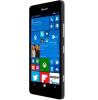
While I have seen Windows Phones in the past the new Lumia 950 is the first for a while. In theory, as a Windows desktop user of various versions from 3.1 to 10, this should make me feel right at home after those initial problems we all face with a new phone.
Recently I got used to using an iPad and an iPhone without too much difficulty so the latest Windows Phone should not cause too much trouble, should it? This is of course something developed by Nokia who a few years ago were the major player in phones this is now in the hands of Microsoft, hence the Windows phone. As I have a Windows account the setup was easy and in fact I could have imported everything but I always like to see what a new user would have to go through.
While Android and iOS are the dominant force with regards to smartphones, they are not the only choice. Windows Phone 8.1, with a promised upgrade to Windows Phone 10, is a viable alternative.
Continuing to play “Catch-up” and join the major players of Android and Apple in the mobile phone arena, Microsoft has released the Lumia 640 as it first offering to appear without any reference to the Nokia name that was previously associated with the Lumia brand. With its 5-inch touch screen delivering 1280 x 720 pixels at 294ppi, this Windows 8.1 Handset is available in a choice of blue, orange, white and black.
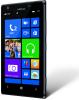
The Nokia Lumia 925 is a 4G premium phone which Vodafone is offering in both 16GB and 32GB versions. It runs Windows Phone 8.0 so that, as well as being a good all-round phone, it is ideal for those for whom compatibility with their desktop applications such as Microsoft Office is important.
The phone is well-built, is black in colour and being 129 x 71 x 8.5mm thick fits comfortably into one’s hand. Also, weighing 139 g it isn’t a heavy burden in the pocket or handbag. The AMOLED 1280 x 768 (WXGA) display is very easy to read both indoors and in ordinary daylight and, being gorilla glass, the screen is robust and scratch-resistant. The micro-USB connector, the 3.5mm jack and the micro-SIM slot are all on the top edge while all the buttons are on the right hand edge.
For anyone not using touch I feel that Windows 7 is where you should be. However as most new machines now come with Windows 8 I gave up a nights sleep to go through the long and torturous process of upgrading from Windows 8 to Windows 8.1.
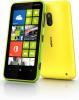
As one of the original market leaders in the mobile phone sector, Nokia is now facing a massive battle from the forces of iOS and Android. As part of the Nokia offensive is a new Lumia model.
Like other models in the Nokia Lumia series, the Lumia 620 smartphone offering is a Windows Phone 8 device. This latest model is being targeted at the more youthful, fun-loving market sector. To this end, the Lumia 620 will be available in a range of colours that could include, depending upon your location, lime green, orange, magenta, yellow, cyan, white and black. My review unit was the white model.
This is the current latest version of Microsoft Office, it has a very new and somewhat sinister edge to it in that it is now a item that comes with a licence to allow its use for 12 months after that you need to pay to keep using it.

On a very cold day at the start of February Microsoft launched a free app for Android. Those with long memories will know they recently purchased Skype a free online telecommunications product and also offered everyone a free 5GB Sky Drive.
One Note first launched in 2009 and my version was an option within Office 2010 (Office 14) in fairness it was not something I have used much until now but as we all have numerous devices using different ways of control, moving shared files around is something that one device on the Cloud (Sky Drive) is ideally suited to do. First some background to One Note, it comes as a part to most paid versions of Microsoft Office.
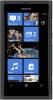
Nokia have recently jumped off the Simbian bandwagon and joined forces with Microsoft. Here is their first offering together Nokias phone expertise and Microsofts mobile operating system when Windows 8 arrives on the PC it is rumoured to lot a lot like this.
My first surprise is that it uses a Micro SIM and so many phone providers think it is only Blackberry and Apple that use this smaller SIM. My own opinion is that it is fiddly to fit, but another journalist friend of mind thinks it is the way all phones will go. Still once in, it need not move. Technically I am told it is possible to cut a full size SIM.
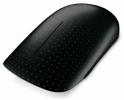
Touch is the current hot topic when features are mentioned. Now Microsofts latest mouse joins the party.
While Microsoft would be only too happy to wave a fond farewell to Windows XP, there are many users who are determined to continue using this familiar friend on their computer. As the end of mainstream support for this operating system has failed to encourage these XP fans to switch to Windows 7, maybe Microsoft has decided to offer a different type on inducement with the launch of the Touch Mouse which will only run on Windows 7 and subsequent versions.
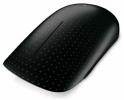
While regular readers will not be surprised that the latter does something else almost everything from Brando does, they might be more surprised that the former is far more than a standard mouse but you will need to have Windows 7.
It is 12x6x3cm and weights 130grams with the supplied two ‘AA’ batteries inserted. The base has an on/off switch to save power when not in use. It can also hold the wireless transmitter when not inserted in a USB port of your PC.
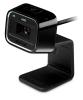
Adding video capturing and communication facilities to your computer is the task of a webcam such as a high definition device from Microsoft.
The presence of a built-in webcam is becoming a fairly standard feature with a number of laptop manufacturers. However there is still a need for a standalone webcam that can provide better quality images and be mounted in various convenient locations such as a monitor or worktop. One such device is the Microsoft LifeCam HD-5000.
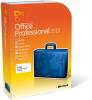
At the start of the year it appeared as betas on some magazine discs. Then absolute silence until June when I saw a couple of distributor adverts, it transpired the launch had happened, a quick skim of my journalists friends and no one knew, so now it seems Microsoft or do I mean their numerous PR agencies - tells no one about the arrival of products.
There are three paid for versions available. They are Home and Student at about £100, Home and Business at around £200 and Professional at about £400. All these figures are ‘ball park’ but it gives an idea of the differential. All these versions now have the ‘ribbon’ interface, the Office interface called Backstage are still opened from the ‘File’ menu as not even Microsoft would dare to change that Holy of Holies.
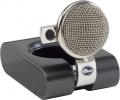
Here I am looking at two rather nice webcams. First an offering from Blue Microphones that obviously features a quality microphone. Second an offering from Microsoft that is HD and offers far better images than most.
While everyone will see the large headed microphone that forms part of this device most will not be aware of the 2MP webcam in fact it can be invisible as it can be retracted inside the back of the microphone head when not in use. Describing the size is somewhat difficult but I will give the maximum and minimum sizes as it can be either and several in between for good measure. 15x7x8cm down to 8x6.5x7cm. The only thing that cannot change is the microphone head.
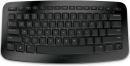
Everyone thinks of Microsoft and software in the same breath, mainly for the operating system but of course there is Office and other programs such as AutoRoute as well. Here I am looking at two items released recently.
Overall this takes around 50% of the space a normal keyboard takes. On a desk this may not be that important but in the lounge or on the move every inch (or lack of an inch) counts. It is 31x15.5x1.5cm.with the supplied 2x‘AAA’ batteries inserted. The tiny 1.8x1.1x.4cm wireless dongle fits under the keyboard when travelling. Plug it in to any USB port and a few seconds later you are typing. It has 76keys including a single four way action key for the direction arrows.
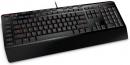
While many games support the use of a gaming console, some users are not comfortable with this type of approach and would prefer to use their keyboard as their main control method.
In the past I have looked at a number of keyboards. Some could be classified as general purpose; others offer additional multimedia controls; while occasionally you would get light displays and one, if memory serves me correct, could be rolled up when not in use to save on space. However this is the first time I have looked at a keyboard designed specifically for the hard-core gaming community. The keyboard in question is the Microsoft Sidewinder X4 model.

Until a few years ago certain consumer products from Microsoft used to have versions released every year, now some like Works are updated occasionally, others like Money are no more, here the 2010 version of AutoRoute.
I deliberately installed this on a not that powerful Windows XP machine just to see if it still would work on a ‘non power’ machine. It took 7 minutes to install from the DVD and used 2.054GB of hard disc space, this also installs Office Database, Visual C++ and Text to Speech module before the Auto Route package, all in all quick and easy. It comes in a DVD case sized box that contains a DVD case with the product and beside this a GPS locator unit.
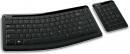
As somebody who spends a great deal of time typing, my choice of keyboard does need to combine functionality and, more importantly, ease-of-use.
Keyboards have come a long way since these heavy clunky models, decked out in computer grey, that were attached to my early computers via a cable with a 7-pin plug. They really made their presence felt with the less-expensive models suffering from keys that lost their letter identification through the effect of finger pounding.
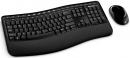
Like fish & chips, bread & butter or UK Bank Holidays and their associated rain and traffic jams, the keyboard and mouse go together hand-in-hand.
While it is possible to purchase a keyboard and mouse as separate items, there are several desktop sets available that bring together these elements as your interactive tools for communicating with your computer. One such example recently arriving on my workspace for testing is the Microsoft Wireless Comfort Desktop 5000 product which comes with the claim of “Being designed for comfort”.
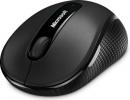
A Wireless Mobile Mouse
While Microsoft is best known for its software, the company also has a well-establish hardware business. A long standard element of the hardware side of the business is the development and manufacture of numerous mice. Joining the ranks of Microsoft mice is the Wireless Mobile Mouse 4000. As its title suggests, this mouse uses wireless technology for communicating with the computer and has been designed more for the notebook rather than desktop market.




Main Menu


