Reviews related to : Keyboards and Mice

Adding a light enhancing backdrop to your gaming action, this next product allows you to customise your keyboard layout and use.
Trust, a well-known and respected company involved in the manufacturing and production of a variety of computer accessories, has added to its range of devices with the release of its . This particular product is aimed at the gaming community whether forming part of the PC, Playstation or XBIS family who will appreciate the keyboard's functionality and the feedback delivered to the player. As is my usual approach I have been using this mechanical keyboard as part of my PC set-up.
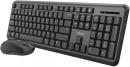
This Keyboard and Mouse set from Trust is sold as 'silent'. Like almost all keyboard/mouse sets these days they are 'wireless' so you have a far greater area available available to use them.
The keyboard is 44x13x1cm you can raise the back from 2cm to 3.5cm with the provided lift out step. The keyboard has 107 keys with the top line the function keys having a further 13 actions via a two button action. It is powered by two 'AAA' batteries already inserted and waiting to be activated by pulling out a short paper lead. There is an on/off switch just above the numeric keypad and to the left of the three LED's.
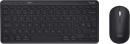
This set is a little different, it can be Wireless or Bluetooth and does not need any batteries, it can be connected to up to three devices, the mouse is small and the keyboard even smaller. While the alpha and numeric keys are full size the other keys are small and the top row and function are on a rotation basis so don't lose the User Guide or you will be scratching your head for a while.
The mouse is 10.5x6x2.5cm and weighs only 66grams. The Keyboard is 28x12.5x1.5cm the last measurement is at the back at the front it is only .8cm. The keyboard has 82 keys but as the top line doubles up it could be 96 as actions vary. The keyboard can be set for iOS, Windows, Android or macOS.
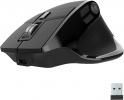
Most of us take a keyboard or a mouse for grantage they are just there and we use them. Often they are Wi-Fi sometimes they are corded and just occasionally Bluetooth. These from JLAB are all three. The mouse has an added plus in that you get a three month trial of TIDAL probably the best widely available streaming service.
This is not a small mouse, it is 12cm from back to front, between 5 and 8cm wide and 4cm tall. Apart from the normal two buttons and scroll wheel there are sic other programmable ones. Not finished yet as the left side has a thumb rest and indeed a OLED display showing the amount of battery remaining and indeed which mode you are in. The base has an on/off button and a mode change button with the infra red between them.
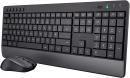
This latest Keyboard and Mouse set from Trust is said to be their quietest. So if you are someone who the tiny noise of a keyboard clicking disturbs you then this could well be who this set is aimed at. I can understand if one person is typing in an otherwise quiet room that the keyboard can sound loud or indeed if someone is typing while others are watching TV or listening to music.
This Trust TREZO Quiet Keyboard Set measures 44x18x2cm and the last can be increased at the rear by another 3cm if you raise the rubber mounted props. The keyboard has 108 full-size keys plus another six keys beyond the function key row for control of audio. At the far right of this row is on/off button and the normal three LED’s. There is 4.5cm clear in front of the keyboard in a sloping area to accommodate wrists.
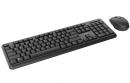
Those of us who use a Desktop or Tower system still need a keyboard and a mouse. I have always used wired offerings, these days you are less likely to have special ports instead having connections via USB. So when I got the opportunity to test a set of keyboard and mouse from Trust my own offering was disconnected and the Trust items connected.
They only use a single USB port and being wire less units you are not tethered in any way. The batteries required for both units are already inserted and you just need to pull the small strip of paper out that stops the contact being made. Insert the wireless USB controller and wait a few seconds for Windows to install the driver. There is an on/off switch on the right edge of the keyboard and a similar slider on the base of the mouse.
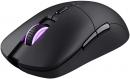
Aiming to please both the wired and wireless mouse brigades, Trust has developed a mouse to satisfy both groups.
The Trust GXT REDEX product is a computer mouse that offers the user the option of wireless or wired connectivity as part of its feature set. With its matte black plastic outer shell, this mouse gives the impression that it is ambidextrous and this would be partially true in that it fits comfortably in whichever hand you hold the device. However the positioning of some of the mouse's controls could cause a problem as I will explain a little later.
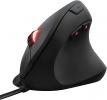
Whether at work or play, your computer relies on a mouse to provide the link between the user and its software.
Trust Gaming, a company developing value-for-money digital lifestyle accessories, has announced the launch of its Redex low latency, wireless gaming mouse in the UK. This product is the GXT 908 Redex device which will be available from Amazon priced at £34.99. Designed as being suitable for use either at play or work, this mouse can operate wirelessly or in wired mode with the latter providing the route for charging the mouse's built-in rechargeable battery.
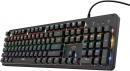
Trust are a well-regarded name in mechanical keyboards, however they do other peripherals and here I get to try out not only the Mazz keyboard but also the YBAR mouse. Both of the reviewed items are USB and solidly built.
The keyboard is 42x13.5x2cm and the USB cable emerges 9cm in from the right. The rear has two 2.5x1cm rubber feet at the front and two pimples at the back if you want to use the keyboard without any rack, it has two 4cm long adjustments that raise the keyboard by 1.6cm. The USB cable is 1.8metres long. The keyboard has 105 keys all well-spaced with .6cm horizontal clearance between each key. In use there is a satisfying click on each press.
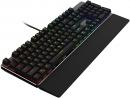
When going into combat you need to make sure your equipment suits the situation and the user.
Whether faced by an AI or human opponent, in either single or multi-player combat, gamers rely a great deal on their input equipment. When it comes to competition, even the not-so-friendly training sessions, the functionality and feel of the keyboard and mouse can make a big difference in the outcome of the contest. Offering to help gamers in this respect is AOC with its new keyboard and mouse gaming devices.
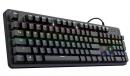
While gamers may take the accolade for success, it is often the keyboard and mouse that is the reason for their success.
Gamers, especially those of the hardcore variety, are a competitive breed who are always looking for ways to improve their performance through the tools they use. Trust Gaming aim to help gamers in this respect with the launch of its GXT 863 Mazz Mechanical Keyboard and its GXT 922 Ybar Full RGB LED Illuminated mouse. While I have yet to see these two products, I have been provided with some details of the keyboard and mouse.
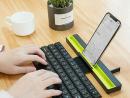
This is a keyboard for those who hate the onscreen keyboard that you get with SmartPhones and Tablets. But it is small in its collapsed dimensions it even has a carry bag and the whole thing is 27x5x3cm and weighs only 228gram including instructions.
The bare keyboard weighs only 189 grams and unfolds to 25x10cm with each key being 1.3cm square and to save you checking those on a normal desktop PC are 1.5cm square so still very typeable. The area behind the keyboard needs another 6cm of space and here is where your Tablet or SmartPhone sits. So total space required is 31cm.
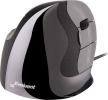
Is the use of a computer mouse causing pain, then the following might help.
ARSI (Repetitive Strain Injury) is used to describe an infection that can occur due to the continuous use of a regular action, Due to the repetitive nature of its various actions, RSI can often make an appearance through working with a computer and certain of its accessories such as the ubiquitous mouse controlling the activities of the desktop cursor.
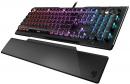
Winging its way from a German Gaming show is news from Turtle Beach.
Adding to its range of gaming accessories, Turtle Beach announced the release of its ROCCAT's all-new Kain mouse series at the recent Gamescom 2019 event. This particular series has been designed to provide the best "click" and "aimed" experience offering maximum precision and performance for the game player attempting to improve their performance.
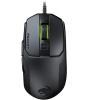
Information has just reached me regarding a brand new series of mice from ROCCAT.
Now part of the Turtle Beach family of companies, ROCCAT has announced the launch of the company's brand new mouse series. This is the ROCCAT Kain AIMO mouse. According to Piotr Gburzynski, Product Manager for mice and keyboard, "The Kain's development challenged all performance-related features for a next-gen gaming mouse. Using a new click mechanism, mouse wheel structure, sensor and performance coating, it fulfilled gamers dreams for the best in reliability and precision.
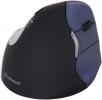
A mouse is a mousse is a mouse but then not all mice are the same. In this case the mouse belongs to the Handshake family developed by Bakker Elkhuizen.
Based in the Netherlands, Bakker Elkhuizen is a company that specialises in the development of high-end and ergonomic hard and software solutions designed to help users adopt a more positive proper working condition for their general environment. As a result the Handshake Mouse has been designed to help compensate for issues such as unnatural posture practices which can bring about the development of wrist and lower arm problems that can occur through Repetitive Stress Injury (RSI).
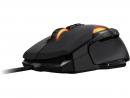
With its German background, this next mouse has been designed for gaming use.
The Kone AIMO mouse features the Roccat developed ONE-EYE optical sensor which is based on Pix-Art technology. Offering to provide smooth movement and precise targeting, the OWL-EYE optical sensor can operate at a range of adjustable steps from 100-dpi up to 12,000-dpi with recommendation in opting for a range of between 400 and 3000-dpi for a more natural feel to the response from the mouse’s behaviour.
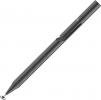
Artists tend to use a pen or pencil when creating a picture, so why not use something similar when working on a computer screen.
As the capabilities and feature sets of modern computer devices develop in various ways and directions, so the available tools adapt to take advantage of the changes made to the make-up of our must-have units. Take, for instance, the humble pointing tool used to provide the user with the means to carry out tactile communication with the computer.
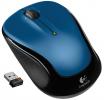
Some people hate a trackpad and as more notebooks are sold today than PC’s they either have to learn to accept one of just maybe find another solution and that solution could be available in the form of a wireless mouse like this small offering from Logitech.
The mouse is small – without being tiny – it is 9.5x5.5x3.5cm and weights a total of 87grams with its receiver. It is powered by a single ‘AA’ battery that is stated to last 18 months. The receiver is tiny at 1.8cm long and 1.2cm of that goes into a USB port so only .6cm sticks out. I tried it on both a Windows 7 and Windows 10 computer and in both cases it worked almost instantly.
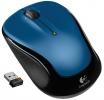
Making its presence felt in the UK, Reichelt Electronics has a range of competitively priced products including this next item under review.
Digging into the depth of my memory box, I seem to recall a time when the company responsible for the development of this next product was often referred to as the Mouse Company and no that company was not Microsoft. In fact the company with a reputation for manufacturing mice was none other that Logitech.




Main Menu


