Reviews by category
A Six-button Mouse



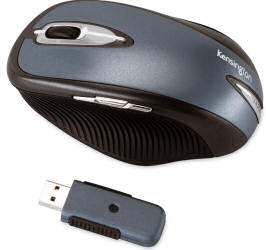
Occasionally a wave of nostalgia creeps into my thoughts as I remember the time when mice (the computer version and not those midnight visitors to my secret supply of sweets) had balls and were permanently attached to the system box via their tail. Fortunately these moments are decreasing as new buzzwords and features are added to the modern generation of these input devices that allow us to mouse around whether engaged on productivity or gaming tasks. Instead of balls we have optical technology and wireless has replaced, in many instances, the trailing tail. We can also add USB connectivity and the latest laser technology for increased precision when aiming to take out members of the opposing forces.


One such example of mouse evolution is Kensington's PilotMouse Laser Wireless Pro. The black and blue rodent, with some silver trimmings, is of the bulky style and definitely is more suited to the right-handed rather than left-handed user. This latter point is emphasised by the ridged rubberised side panels. The left panel indents for the thumb while the right panel forms a resting area for the little finger - it feels uncomfortable when held in the left hand. Initially this ridged panel effect felt odd but as time wore on it developed a more pleasant tactile sensation and I even found myself dragging my thumb along its panel to add to the experience.
The mouse is powered by two AA batteries, which are supplied, and communicates with the computer via a USB receiver. These batteries are stored in the base of the mouse. An on/off switch helps conserve battery power which Kensington estimates should last for up to nine months. Buttons, situated on the mouse and receiver, need to be depressed to activate the initial connection so that the mouse takes control of the cursor.
There are six buttons, divided equally between the top and left side of the mouse, which can be personalised to suit the user's method of working. In what has become the accepted fashion, the standard left and right buttons run the length of the mouse. Sandwiched between them is a rubberised wheel that provides forwards, backwards and sideways scrolling. Switching to the left side, there are three further buttons that, by default, are set to move you backwards and forwards through appropriate applications plus switch between running tasks.
Kensington has provides MouseWorks software that allows you to carry out various customisation options as to the way the mouse operates. Setting up this software proved to be slightly problematic. On the first attempt the set-up hung and was unable to complete the process. However running the installation a second time was more successful and the Kensington supported features were added to the standard Mouse Properties screen. You can set mouse click and scrolling speeds plus select from various choices that include selective commands and options to paste text; access menus; and control multimedia or Internet activities from the mouse buttons.
According to Kensington, this mouse will be available from Misco and PC World Business but at the time of writing there was no mention of this product on the website of either company. In fact I could not even find the product on Kensington's website. Pricing has been set at £34.99 for a mouse that works well using the latest technology. A PC running Windows XP/2000 or a Macintosh running Mac OSX v10.2 or later will be required.
http://uk.kensington.com/html/6822.html
The Kensington Wireless PilotMouse is now available from Amazon for £15.15 :
| add to del.icio.us | Digg this review |
| StumbleUpon | |
 !!
!!






