Reviews by category
A Smaller Wireless Desktop Set

Buy Now...

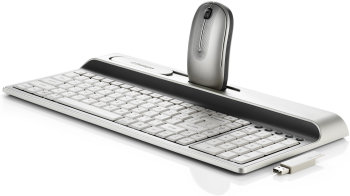
The latest example of keyboard and mouse to come under my finger-tip control is the Kensington Ci70 Wireless Desktop Set which combines innovative stylish aspects with a mouse docking feature. The marketing people at Kensington have put some thought into the packaging design for this desktop set. By using a Perspex top to the packaging, the user is able to see both the keyboard and mouse laid out as if ready for use. With the modern look to the keyboard and mouse, the ability to see what you are getting should encourage sales.
Removing these two items from the box reveals a 140cm USB extension lead plus two packs of AA Duracell batteries needed to power the keyboard and mouse. The USB wireless receiver is not immediately visible. However by quickly checking the base of the mouse, you will discover the wireless receiver tucked into its own storage compartment.


Setting up this desktop set is just a matter of inserting the batteries into the keyboard and mouse before connecting the USB receiver, either with or without the extension lead, into a vacant USB port. The new kit should be automatically recognised by Windows XP/Vista and you will be ready to go.
Smaller (Kensington estimate 35% reduction) than many other multimedia keyboards, this Kensington device adopts a two shades of grey colour scheme. The keyboard design combines a relatively thin body with a raised platform at the rear. Due to the smaller size some rearrangement has been necessary for the main layout of the keys. This will require some adjustment on the part of the user especially with regards to the non-alphanumeric keys. The keys themselves are almost flush to the unit's body and this again might require some adjustment on the way you type.
Positioned above the numeric keypad are a set of multimedia designated buttons. These allow you to adjust the volume level, move between tracks and stop/start your favourite music. Generally these keys performed their different tasks with various media players although I was unable to get the tracks selection controls to work with Winamp. I am waiting for Kensington to get back to me regarding this problem.
The raised platform at the rear of the keyboard serves two purposes. In a depressed area are a number of pre-defined hot keys and a slide over panel. The hot keys have been set up for calculator, search, email, Internet access and whatever is your default media player. I was unable to find any method of changing the default settings. By sliding the panel over the hot keys you reveal a docking bay that can be used to store your mouse when not in use. When stored in this bay, or when being used to house the USB receiver, the mouse will be turned off so saving on battery power.
As with the keyboard, this mouse is thinner than a standard model (again 35% according to Kensington). Adopting the same colour scheme as the keyboard, this is a two-button wheeled mouse which is ambidextrous in design. The mouse features a built-in optical sensor capable of 1000 dpi while the wheel doubles as a low battery indicator.
Although this desktop set lacks any programmable features, it does cover the functionality that most users will require under normal circumstances. The reduction in size could well be a consideration for anybody with a limited amount of work space. Wireless strength, at distances up to five feet, caused no problems while line-of-sight was not as issue. The Kensington Ci70 Wireless Desktop Set has been priced at £29 from Amazon, on the following link :
http://www.amazon.co.uk/gp/product/B000XSR4U8?ie=UTF8&tag=gadge0a-21&linkCode=as2&camp=1634&creative=6738&creativeASIN=B000XSR4U8| add to del.icio.us | Digg this review |
| StumbleUpon | |
 !!
!!






Comment by Jo, 6 Apr 2010 20:50