Belkin Switch2

Buy Now...

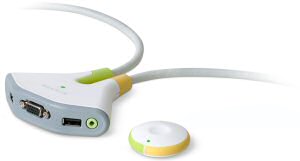
In my house there is a constant fight ensuing between various items of computer equipment and living space. I hate to admit it but it is often the former that wins the day in these battles. Sometimes, though, a compromise can be reached as in the case of a KVM (Keyboard, Video and Mouse) solution. This type of device allows you to run two systems using a single monitor, keyboard and mouse with the ability to switch between each one with the minimum of fuss. One such device is the appropriately named Switch2 from Belkin.
The Switch2 kit comes in various flavours supporting either PS/2 or USB connectivity with or without speaker capability and possessing a remote feature. This review is based on the Switch2 Wireless for PC with Remote (F1DG102Wuk) model that has both USB connectivity and speaker support. Despite its title this kit should also work with a Mac although I have been unable to test this.


Opening the packaging (a struggle in itself) reveals the base KVM device, shaped a bit like an alien's head with two antennae, along with permanently attached leads and connectors (one measuring 59cm while the other is a more generous 181cm); circular wireless remote with battery; and small User Guide. Sockets on the base unit allow you to connect your monitor, keyboard, mouse and speaker set to the KVM while the leads have connections for attaching to the monitor, USB and speaker ports on each computer. Users with a DVI-I monitor will need a VGA adapter as Switch2 does not support direct DVI connections from monitors.
Step-by-step instructions are provided regarding the actual set-up and connections. I was surprised to read that both computers should be turned on during this operation. My reservations initially seemed to be unfounded as everything appeared to progress without problems. I was able to connect the various leads and devices as laid out in the User Guide. Once this was completed I could switch between the two systems using the supplied circular wireless remote switch. Change over was not instantaneous but reasonably acceptable, usually taking three or four seconds before there was a response.
Software is available but this is not provided in the box. You will have to download it from Belkin's website. This is a minor inconvenience but one should have been avoided. This software allows you to switch systems via the keyboard or system tray. Again there was no problem although you do need to install this software on both systems. Any change over delay seemed slightly shorter when using the keyboard - you are given a choice of which hotkey combination to use.
It was at this point that I encountered an unexpected problem (is there any other kind?). With my previous set-up I was able to start either system without powering up the other machine. When I tried this with the Switch2, there was a long delay, often lasting several minutes, before a boot-up sequence would commence. This would happen with either system. There was also an error message, regarding a Mac address, whenever I switched on one system.
When both systems were switched on and running, Switch2 works fine, if a little slowly when switching between systems, but the other problems I faced has to count against this product. Reverting to by previous KVM kit immediately resolved the problems I had faced with Switch2. Expect to pay around £35 for this product.
http://catalog.belkin.com/IWCatProductPage.process?Product_Id=278892
| add to del.icio.us | Digg this review |
| StumbleUpon | |
 !!
!!






Comment by christian, 9 Jan 2010 19:36
Mac Osx 10.6.2 (Snow Leopard) don't detect correctly my LGW2252S monitor using the belkin KVM, so is impossible to set the correct resolution of 1680x1050 .
When you connect the device to the Mac your LCD display will be detected as a generic 4:3 VGA Adapter. That's the problem!