Reviews by category
Flatron Viewing

Buy Now...

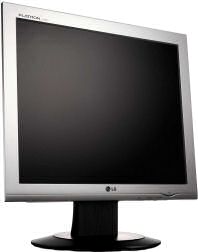
For a long time my main computer display was handled by the original Flatron CRT monitor from LG. Sad to say that monitor has now departed the scene, taking with it its built-in set of USB ports, after providing many years of excellent service. Currently acting as a temporary replacement is another Flatron model. This is the LG Flatron L1732P unit.
Unlike the original big beast that had taken up so much room on my work space, this latest model is much less demanding in that respect being of the LCD type. Mounted on its circular, detachable base, this 17 inch LCD has both VGA and DVI-D connectivity with appropriate leads included as part of the standard package. Once positioned on your desktop, you can set the tilt (from -5 to 25°), swivel through 350° and adjust the height rising by a maximum of an extra 3.15 inches. Using the supplied software, you can also rotate the panel through 90° increments to suit various applications.


LG has not veered far from the accepted standard for the look of this LCD model. A fairly standard silver-grey bezel surrounds the panel. This bezel displays appropriate logos and the model number. There is also a smiley mouth shaped power light that glows luminous blue when turned on, situated in the bottom right corner. I find this quite appealing but can image that to some it would be distracting. Fortunately in such cases there is an option to turn off this light.
All the user accessible controls are hidden on the underside of the bezel. Using these controls you can bring up the OSD (On-Screen Display) and make adjustments to brightness, colour, contrast and screen position to mention just some. The supplied Forte Manager software also allows you to carry out these tasks, with additional help and assistance, from your desktop. However, while this software worked fine on one system, it failed to operate to its full capacity on a second system so limiting me to just the OSD method of making adjustments.
The L1732P comes with various pre-set screen viewing modes that have been designated as normal, day text, day movie, day photo, night text, night movie and night photo. It is a simple matter to cycle through these pre-sets to select the most appropriate mode for various activities. Screen quality, in all cases, is crisp with realistic colours and clear definition.
With its fast response time of 4ms, 1280 x 1024 resolution, this LCD screen will appeal to many users whether for productivity or game-playing needs. Add in the analogue and digital input options with the tilt, swivel plus adjustable height and you have a quality product. My only worry, as mentioned earlier, is the failure of the Forte Manager to perform as expected on one system.
Drivers are provided for all Windows systems from Windows 95 onwards and Mac OS X. Pricing has been set at £249.99 but shop around you might find it cheaper.
| add to del.icio.us | Digg this review |
| StumbleUpon | |
 !!
!!






