Reviews by category
Humax 32inch Digital/Analog TV

Buy Now...

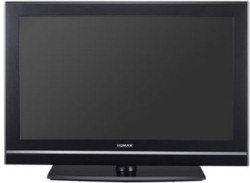
Most of the modern breed of Digital TV's are more of less the same to operate. Plug in the mains lead and your aerial and then switch on. If it's new then it should offer you the chance to scan for channels, if not you need to enter the menu and maybe search a bit for the option. Some scan both Digital and Analog at the same time others like this you need to scan twice.
Whatever the controls on the TV you can probably do everything (apart from switch off) from the remote control. Here every one is different but once you find where various items are navigation is not normally a problem. This 32" Humax TV has outer dimensions of 81x53cm and the stand is 52x23cm this raises it 4cm from whatever you put it on.


This remote is slightly different in that it has 38 keys in the open and another 15 hidden behind a slide. I always like to try to work everything out without recourse to the manual. In this case it's in four languages with the first 68 pages in English.
I expected all the normal controls to be in the open but for some reason the 'Text' button did not work with Analog Teletext and this was found behind the slide. The other problem I had was getting PIP (picture in picture) to work as required so the manual had it's uses.
I used this on it's stand but it is possible to wall mount, compared to other such units it's not that heavy but be sure you have good fixings otherwise no wall.
I find it refreshing that there is an on/off switch so you can 'save the planet' and you are not required to leave it in standby if you do not wish to. For some reason whenever I switch it on it defaulted to SCART 2, while I have something plugged into both SCART sockets neither are on but this was far from new when I got it so that could be the reason. It was not that quick to warm up (from standby or off) around ten seconds till you get the No Signal message when you can press the TV/AV button and change to either Digital or Analog.
Apart from the two SCART connectors there are two HDMI, component, DVI and even VGA so you could connect a PC. Unlike some TV/panel combinations that have a maximum of 1024x768 for PC use this can display slightly better at 1280 or even 1366 but no better than 768 the other way. However I doubt anyone would use this for PC use except in an emergency.
For those with Smartcards (for the encrypted Digital Channels) there is a slot in the back. There are also the more traditional now and next as well as a 7 day program guide.
Picture quality was good as was sound with a choice of several settings for brightness type and sound type. Channel swapping was not lightning fast but okay. When you swap from Digital to Analog it remembers the last used channel which is fine unless you happen to want another when you must wait a few seconds for the TV/AV menu to clear before you can change it.
Whenever I turned anything on in the SCART sockets the TV automatically changed to that item but when switched off you had to go back via the TV/AV button on the remote.
Everything I tried - even the VGA for PC - worked without problem. As a TV on Digital and Analog it is fine as is anything you connect via SCART or HDMI etc. It is lighter than even other 32inch models, just the couple of small niggles mentioned.
Doing my Internet searches found the Humax LGB-32DST at a best price of £411.99 including delivery from the first link below.
http://www.amazon.co.uk/gp/offer-listing/B0010ZTKF0
http://www.humaxdirect.co.uk/product.asp?ProdRef=10006&cat=lcd
| add to del.icio.us | Digg this review |
| StumbleUpon | |
 !!
!!






Comment by Kyle, 14 June 2008 17:31