Accessibility
http://www.gadgetspeak.com/gadget/article.rhtm/751/474242/Top_Up_TV_Thomson_DTI6300-16_DTR.html
email articleprinter

Digital Television Recording with Top Up TV Anytime

The demise of VHS video tape has left a big hole in convenient TV recording not filled by the promise of DVD. This Thomson box from Top Up TV offers a rich set of features at an unbeatable price.
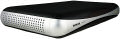
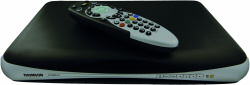
TopUp TV Digital Television Recorder

Hard disk recorders have been around for a little while - most famously pioneered by Tivio and then, in the UK, by the Sky+ box. Great if you're a Sky subscriber. With the advent of FreeView based Digital Television Recorders (DTR) this facility is available to the masses without the expense or restrictions of a subscription-only services.

Top Up TV have launched their own product in this space - the "Top Up TV+ DTR" - not quite as catchy as "sky+" - but don't let that put you off. The hardware is from Thomson - the 'DTI6300-16'.

This DTR offers an impressive feature set - including two independent tuners and a 160Gbyte hard disk onto which programmes can be recorded. The two tuners allow you to record one channel while watching another - or to record two channels at the same time. 160G is sufficient for storing around 100 hours of television - enough to keep even the most ardent TV addict satisfied!

Over and above the functions of a traditional video recorder, hard disk systems integrated with digital TV offer a wealth of additional functions that, once used, you'll wonder how you lived without. 'Pause Live TV' is an oft quoted example. At the press of the button literally freeze the action on a live TV show. No fumbling around looking for a spare tape - rewinding the tape or other time wasting exercises. Ideal for when that unexpected guest turns up right in the middle of the latest episode of Lost, or the phone rings with a vital double glazing sales offer you can't resist. You don't have to wait for the end of the programme to start watching. One of my favourite uses of this feature is to pause the first 10 minutes of a show and then fast forward through the adverts!

Digital TV also benefits from integration with a live programme guide - EPG (Electronic Programme Guide). There have been countless attempts to make it easier to correctly record programmes from bar-codes to special numbers printed in the papers. All obsolete now with EPG - the DTR knows the channel you're watching and automagically stops recording at the end of the show. Timed programming is also simplified by selecting the programme you want to record from the guide. No coming home to watch the latest Big Brother only to find that you've recorded an hour of cricket because you got the channel wrong. And finally you can even decide to record an entire series with one instruction - never miss an episode of Dr Who again!

This kind of operation has been dubbed 'time-shifting' - using DTRs to choose when to watch a programme rather than have that dictated by the broadcaster. In a recent survey conducted by Top Up TV, 57% of their DTR customers said that they regularly used the time-shift feature to watch their programmes at a time convenient to them.

I've been using this product for a little while now with only minor hiccups, most of them non-serious. One of the most annoying 'niggles' concerns video rewind which often results in a click of the 'rewind' button sending you all the way back to the start of the programme rather than simply reversing play. I've checked with the Top Up people and this is a known issue and a fix is currently being tested (more in a moment). The user interface needs a little polishing, mainly in user feedback. It can often be unclear whether the action you've taken on the remote has been received.

The most serious problem concerned on a couple of occasions when the device locked up, requiring power to be removed. On one occasion this coincided with rewinding a video and so it is quite possibly part of the problem mentioned above.

Software Upgrade

I indicated the problems above to be 'minor' - even the odd lock up - why? Because of the excellent and transparent software upgrade service provided by the Top Up TV people. This happens over night in the same way as programme downloads - over the air. You don't have to do anything and you don't loose any content. In the few weeks I've been using the DTR the software has been upgraded twice resulting in more reliable software and an improvement in the user interface. While one can argue that products should be completely tested before being shipped - this is mitigated in cases such as this where there is a reliable post-ship software upgrade feature.

In my smiley rating I had to take into account the product as I reviewed it and so the niggles I experienced reflected in ease of use - without those ease-of-use would have been at least a 4. Given the downloads so far though I'm pretty confident that the engineers are serious about fixing bugs - and if I still have the product here after the next software upgrade I'll come back and comment on the changes!

TV Anytime service

Most people in the UK now have at least heard of digital TV, and of Freeview as the natural heir to traditional analogue TV. Freeview is received through your existing, standard TV aerial, and once you've bought suitable hardware is free to use - just like terrestrial TV. You do get a lot more channels, including all your existing favourites.

The technology behind Freeview also offers the opportunity to deliver additional 'paid for' services. TV Anytime is just one such service and it works in conjunction with the DTR+ box. The system works by using the recording capabilities of the DTR+ box to 'download' a number of programmes to the internal hard-disk over night. Up to around 150 programmes will be automatically downloaded ready for you to browse and watch at your leisure.

Programmes are downloaded from a number of specific channels including the likes of uktv-gold, Paramount Comedy, Disney and British Eurosport. A set up menu allows you to remove channels that do not interest you.

TV Anytime is activated through a special 'feature' card that slots into the front of the receiver. The basic price of that service is £9.99 per month for the basic service, and there are some premium channels such as Setanta for sports that attract an additional charge.

The downloaded programmes are valid for 7 days from when they are recorded, after which they are automatically deleted to make way for more downloads. If there is a programme in the list though that you want to keep for longer you can simply save that to the user area and you have as much time as you want.

I don't watch a lot of TV, however I found it really good that when I wanted to watch something and the usual channels were devoid of anything interesting I could usually find something interesting in the downloaded library.

Summary

At around £85, ignoring TV Anytime, you have an excellent DTR capable of storing over 100 hours of programming, recording two channels simultaneously and in the process probably avoiding a few arguments over Christmas! For those of you that want more variation the option of Top Up TV Anytime to augment your own library is an excellent idea and worked very well.

The best price I found for the Top Up DTR+ is from Amazon at £85 including shipping and a 30 free trial for TopUp Anytime. It's also available from John Lewis for £99.95 with a 2 year gaurantee.

More information can be found on Top Up TVs website :

http://www.topuptv.com


Follow us on Twitter!!

add to del.icio.us Digg this review
StumbleUpon
Reddit

Reviews by related category

Have your say!

What's your experience of this product? Agree or disagree, or just have a question? Use the box below and let everyone know.

[ Add your comment | Watch this articleNew! ]

Rating:

Comment by PencilDick, Jan 22, 2010 23:29

Sorry to reset your box press 1,3,9 and then 7
Rating:

Comment by BobBeer, Jan 22, 2010 10:43

Does anyone have any experience of removing the recordings from the internal hard drive, I've smashed the piece of C**P to pieces as when we try and watch anything recorded on the box nothing happens it now stops all the time and takes 4-5 attempts to get it working again and is no longer recording, so before I do the Lose it all reset I want to try andd get the data off
Rating:

Comment by PencilDick, Jan 6, 2010 22:05

To reset your Thomson box press Menu.Setup.Help and then on your control press 1,3,7 and 9 to open up the engineering menu, Then press the green button and you will reset your box, All previous recordings will be lost though, Cheers
Rating:

Comment by stevehan, Nov 29, 2009 17:49

Found this website ,quite helpful so have reformatted the hard drive and now works.Watch this space.Series option not available, u=is there a fix ??http://www.topuptv.com/help+centre/setup+and+troubleshooting/Fail+boot+up#Hard+Drive+Space

Steve
Rating:

Comment by stevehan, Nov 29, 2009 16:02

got Thomson DTI 6300-16 -- has topeed recording -- keeps coming up in messages unable to record #261 .  Recording light stays on also.Have tried powering down, rescanning.Also lost all the recodings in library.Any ideas, reset, thoughts ??
Rating:

Comment by jessica1, Nov 27, 2009 10:10

Can anyone tell me if they experience blank time slots on the programme guide on their DTI6300? Sometimes the guide does not indicate what programme is on even up to the time that the newspaper listings says it should. This then stops you being able to record that particular programme!!
Rating:

Comment by joanne, Sep 4, 2009 15:57

I have now had 3 of these goodmans digi boxes the last one having kept going for more than a year with no problems was a record. Alas this one also died and the amber light would not go to red, let alone green. I googled this problem ad found this site and just for fun tried to reset the box (this has not worked before ad I was not oo hopeful having tried pressing buttons and nearly hitting it!) I unplugged it waited and plugged it back in whilst holding the on button on the front panel the amber light came on ad I immediatley pressed the remaining buttons right to left(not menu or ok)repeated 3 times then pressed menu  then ok on the front panel and wahoooo!! All working and I have not lost anything in my library. Thank you so much!!!
Rating:

Comment by eddieriff, June 15, 2009 23:48

Unfortunately pj, not everyone is listening.
Rating:

Comment by pjbonner, June 15, 2009 23:10

Hey!eddieriff glad to see you're still trying to convince people not to buy this piece of pooh.As most of us found out to our cost many months ago.Good-on-yer!
Rating:

Comment by eddieriff, June 15, 2009 22:04

Take it back, NOW!
Rating:

Comment by Susanj, June 15, 2009 20:45

Hi My Thomson Box stopped working on the 4th May too, however there are no lights on the box at all. A few weeks before this it stopped downloading Picture Box and any Top UpTV downloads. When it packed up we purchased a new box from Argos. And although my husband went to bin it I stopped him and shoved it in the cupboard. I phoned TopUP TV to register my new box, but since then I have received no downloads at all. I keep phoning TUTV trying to rectify the problem but still nothing. This is 5 weeks now, (8 counting the old box ) they have offered to exchange my box ( which is out of guarantee) and I am letting them have my old box back (glad I stopped hubby binning it) But I cant understand why the new box wont download, it records ok, sometimes a bit erratic ie put it on manually to record an hour and it records for an hour and a half but comes up as 2 min........ Aghhhhhh is it me. Thinking of taking new box back to Argos as faulty. Any ideas
Rating:

Comment by adie-cook, May 26, 2009 13:17

Hi to all the people experiancing technical issues with their Thompson top up tv boxes.
I have gone through 3 of these totally useless boxes now and have had them same fault with all of them namely that the picture will freeze even when your just watching the tv. I have contact Consumer direct to find out what rights/legal actions i have and can take against top up tv in aid to obtain a refund from them. I have below written their reply and i quote:

"based on the information you have provided,under the supply of goods and services act 1982/common law scotland. This provides that work should be carried out with reasonable care and skill and goods supplied as part of this service should be of satisfactory quality. If they fail to provide this, you can hold the trader in breach of contract and seek to claim for any consiquential losses resulting in the breach of contract". They have advised me to write a formall letter to top up tv outlining your complaint and that "their attempts to replace the box have clearly failed and request that they provide a refund" you should also inform them that you want a reply from them in this matter within 7 working days. Consumer direct also state that "it is adviseable to ask for a reasonable outcome,as if you are unable to resolve this matter with the trader then ultimatly it will up to a judge to decide in court". They also have given me the following information if you have purchased your box on a credit card "in addition because you have purchased your box on your credit card you may also be able to argue under section 75 of the consumer credit act 1974 which will make your credit card company equally liable under the supplu of goods and services act for this reason you may wish to inform the credit company of this problem in case you need to recover the purchase price from them at any stage".
I have taken their advice and done just what they have said above i just need to await their response, i do know however that numerous other people have done just this and are now getting a refund. It is time that top up tv stand up and be counted for providing a utterly useless service and stop giving people shoddy equipment as they STILL are. I would advise that anyone and everyone who is fed up with the problems they are or have been having to do this as well so then they will have to admit that there is a problem. I have the contact details for consumer direct and also for the top up tv head office if anyone would like them let me know.
Rating:

Comment by cazzasguy, May 17, 2009 9:01

Hi Sophie,

You'll just have to keep trying I'm afraid, the buttons have to be pressed within a very short timescale and if you're more than about half a second out, the 'trick' won't work. Make sure you keep the power cable out for 60 seconds between attempts and you're pressing the standby button before inserting it. Watch for a light to flicker on the front panel then instantly release standby and press menu followed by ok as quickly as you can. Take care not to inadvertently press them together, it's easy to do as they're so small and the plastic is of fairly poor quality. I was only successful after half a dozen attempts, and a work colleague had to make over 20!!
Rating:

Comment by Sophie, May 16, 2009 21:49

Hey, please can somebody help me? My box is stuck in standby and iv tried the sequence of button several times with no luck. I dont know what to do to fix it?
Anyone please help, thank you
Sophie
Rating:

Comment by disappointed, May 9, 2009 17:39

Yeah, Thanks. Most places selling dont mention the scart lead but saw it on pg 5 s gave it to them anyway. Then had trouble as mum had paid for it, so she had to return it. When she did they never even checked if lead was in bag!

Oh well, she got rid now.
Rating:

Comment by steph, May 9, 2009 16:52

My box did come with a scart lead and it says so on page 5 of the user manual.  Hope this helps.
Rating:

Comment by disappointed, May 8, 2009 13:02

Can anyone tell me whether this box comes with a scart lead as I can't remember. We have tried to return my Mums' box for her but man at Tesco wouldn't take it as it had no lead.
Rating:

Comment by steph, May 6, 2009 20:25

At last - after trying about 12 times using the up down left right method I've got my machine working.  Lost all my saved programmes though - about 15 films!
I've lost the series link though.  I never trusted it enough to use it anyway so it doesn't really matter.  
I looked up the user manual for the Humax on their website and it looked a lot more complicated than the Thomson.  I'd like to know other peoples opinions on different makes.  If it means paying more, so be it!
Rating:

Comment by CRPKENT, May 6, 2009 9:15

Gordon

In my experience the USB port is unuseable ... it is not recognised by any equipment I have (including my PC).

COLIN
Rating:

Comment by Gordon, May 5, 2009 23:42

Mine had the red standby button locked on, tried many times but just successful with the up/down/left/right string of buttons

Now its wworking can anyone tell me what use the USB connection is for near the viewing card.  Can files be saved onto another drivbe via this connection
Rating:

Comment by Chris Davies, May 5, 2009 20:42

Your posts have saved my box from the bin, thanks to you all for taking the time to out on such good advice. Just in time to watch Arsenal lose as well :-)
Rating:

Comment by a_hall, May 5, 2009 20:08

THANK YOU!!!!! Jobs a goodin. Back up and running. Thanks again..!!!
Rating:

Comment by CRPKENT, May 5, 2009 18:29

a_hall

I think you will find that they are (from Left to Right) :-

1) Menu
2) OK
3) Left Arrow
4) Up Arrow
5) Down Arrow
6) Right Arrow
7) Power On

COLIN
Rating:

Comment by a_hall, May 5, 2009 17:43

The pictures on my buttons have vaded over time. Can anyone help me please. I have the DV3 160 DTR. It has seven buttons. From left to right can anyone tell me what their functions are. Please!!! It would really be appreciated!!!

a_hall
Rating:

Comment by Laura, May 5, 2009 15:56

Did what Greener said, after about 5 attempts it worked fine. Still got all the recordings too. Thanks for your help.
Rating:

Comment by baz1962, May 5, 2009 15:16

Hello everyone this is what i did to mine and a friends...
I managed to save all my recordings, remove power then after 20 seconds re-apply power, press standby button and as soon as you see a light flash on the front, press menu then ok, then i left it for 5 minutes , i managed this on mine after 4 attempts, just been to my friends house and done theirs too after about 7 attempts, just keep trying i am sure you will manage it, i know it's very annoying, good luck.....BARRY
Rating:

Comment by CRPKENT, May 5, 2009 13:41

Hello Chris ... Yes my Thomson DTR also packed up on Monday and I am still not receiving any programmes ... it looks like I may also have lost all my 'saved' programmes as well, which is why I asked ealier whether anyone had been successful in 'archiving' from the Hard Drive ... but nobody replied.
... I saved about about 20 films and 30 programmes over the last 3 months !

Regards,
COLIN
Rating:

Comment by chris b, May 5, 2009 13:02

My Thompson DTR packed up on monday with the dreaded flashing red/orange light have tried over 30 times to reset with topups instructions but with no luck!
Has anybody else failed to reset theirs!

Chri
Rating:

Comment by paul, May 5, 2009 9:39

I'm so glad I found this article and relieved I am not the only one with this problem. I have done the sequence of buttons and it does work...it wasnt working to start with as i was pressing the sequence of arrows but then pressing 'menu' and 'ok' on the remote rather than the box! thats probably me being stupid but im just glad its working.

Following the instructions still mean you will lose your recordings, which is very frustrating!
Rating:

Comment by jonw, May 5, 2009 9:30

You need to take a look at the following link which shows HOW TO RESET WITHOUT LOOSING YOU LIBRARY:
    http://www.topuptv.com/help+centre/setup+and+troubleshooting/Fail+boot+up

This was already posted by Chris further down the list of comments but looks like people are missing it.

I've been lucky - my box has been fine, but maybe because I power-down every night so maybe I missed the broken update.

I've copied the instructions here:
1. Remove power to the unit by removing the power cable from the back of the DTR.
2. Wait 20 seconds and restore the power cable while holding in the standby/power on button on the front panel of the DTR.
3. Release the standby button immediately you see a light ‘blip’ on the DTR front display and then immediately press the following front panel arrow buttons quickly and in the sequence Menu then OK
4.The DTR will now show the Orange LED with the Green LED flashing until the revert has been completed in about 60 seconds. The DTR will return to ON automatically.
5. If requested, perform a channel scan to complete the operation

Add Comment

Member of GadgetSpeak™?Not a member?

required but never displayed
 If you're asking a question - join GadgetSpeak first. Then you'll automatically receive an email when someone replies!
Rating for article:

Are you human?

Access code : 3489


Our current Free Prizedraw!!

£200 of Amazon Vouchers

Prize draw

Your chance to win £200 of Amazon Vouchers!

Here's how to enter!

close

Why join GadgetSpeak?

Well - there are lots of reasons to join, depending on you and your interests :

  • Member prize-draws ( this month £200 of Amazon Vouchers )
  • Real reviews - by real people
  • Membership is free
  • Email summary of the weeks reviews
  • Share your product feedback with others
  • Keep in touch with all that's new in gadgets
  • Full of great ideas as the Christmas deadline looms!

Convinced? Come along and join in the fun!

close

Invite friends and family to GadgetSpeak

Why not invite friends or family to join in the fun?

Help us make GadgetSpeak the place to come for free and impartial reviews of the latest gadgets!

Start inviting your friends along!

Installing a new PC? Let TechGuys help!
Mobile Fun
I Want One Of Those
Marks and Spencer free standard delivery

Smiley Rating

Features12
Performance12
Value12
Ease of use12
Overall12

If you like this article then why not link to it from your site!

Use a text link, or download an image

 
GadgetSpeak
Comet