Reviews related to : Logitech
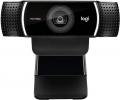
Web Cams until the recent CoronaVirus were something that sat in the top surround of a panel of your Notebook/Tablet, often people worried about being spied upon, recent panels I have seen now have no Web Cam. So hence the need for decent offerings like this one from Logitechh that can keep friends and family in touch.
I installed it on a not that recent Windows 10 system and that involved screwing the tripod base to the camera and plugging in the hard wired USB lead and saying yes a couple of times. So anyone can do it, this means a son or daughter can purchase this online and post to their parent so at least they can chat and see each other, thus keeping friends and family in touch during the current Pandemic.
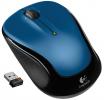
Some people hate a trackpad and as more notebooks are sold today than PC’s they either have to learn to accept one of just maybe find another solution and that solution could be available in the form of a wireless mouse like this small offering from Logitech.
The mouse is small – without being tiny – it is 9.5x5.5x3.5cm and weights a total of 87grams with its receiver. It is powered by a single ‘AA’ battery that is stated to last 18 months. The receiver is tiny at 1.8cm long and 1.2cm of that goes into a USB port so only .6cm sticks out. I tried it on both a Windows 7 and Windows 10 computer and in both cases it worked almost instantly.
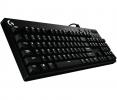
Whether playing to win or just for enjoyment, you need the appropriate tools in order to succeed in the competitive gaming arena.
As part of its expanding range of gaming keyboards, Logitech has released a couple of new Cherry Mechanical offerings under the G610 Orion brand. Constructed of industrial grade plastic for a strong, robust appearance that is strong enough to handle the heavy workload of a gaming device, these keyboards are designated as either Brown or, as in the case of my review model, Red.

The Scuderia FS1 is a wireless Bluetooth speaker dock. The product forms part of the Ferrari by Logic3 collection of audio offerings. As you might suppose from the Ferrari influence the Scuderia has more than a touch of Italian style in its general appearance.
Opening the rather sturdy box (little chance of this product being damaged in transit) revealed that the Scuderia FS1 was packed so securely that it took a little time and plenty of effort to remove the foam rubber casing that totally encased the speaker unit. Included in a separate box were power leads for use in the UK, Europe and America plus an audio lead with 3.5mm jack plugs at either end.
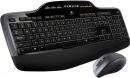
Giving my keyboard and mouse a rest from the usual pounding gave me the opportunity to check out an offering from Logitech.
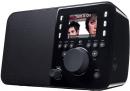
Amongst other things the Logitech Squeezebox Radio is a rather good Internet Radio with the quickest connection (almost no buffering delays) whether you connect using Ethernet or Wireless. Plug In, turn on, select Internet Radio, choose you station and listen.
It is quite small at 21x10x13cm. Mine was black, unfortunately that shiny black that shows every finger mark. The right side has a headphone socket. The rear in an indent the power lead input, Auxiliary input and Ethernet port but even with items plugged in nothing protrudes over the stated 10cm total depth of the Squeezebox. The left side, base and the top are clear leaving only the front of the unit to describe.
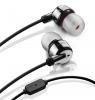
Here I am looking at two pairs of noise reducing earbuds, the first from Ultimate Ears and the second from Sennheiser. They have a number of things in common; the main one is that both reduce external noise so great for the train or tube.
Not a name that immediately rolls off the tongue. From the buds back there is 35cm of single cable before it joins with the two sleeved together for the final 80cm to the gold plated 3.5mm plug that not only suits iPods and MP3 players but also the latest Apple offerings as it has three bands rather than the normal two. The multifunction button (allowing you to answer calls etc) is 7cm after the two leads have become one on the cable.
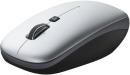
You could say that I am one in a billion. Well not exactly me but rather the subject of this next review.
Logitech has recently announced that it has shipped its billionth mouse which presumably calls for some sort of celebration but as yet I have no information regarding what this might be. The count of one billion includes the V550 Nano model which is currently taking up residence on my workspace in its role as the pointing device for my notebook. Like the previous mouse in the Logitech Nano series, the V550 model is a cordless laser device that links to your computer via advanced 2.
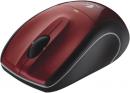
Once known as the Mouse Company, Logitech has not forgotten its roots and regularly updates its collection of pointing devices as can be seen with this offering.
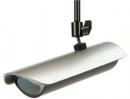
Another item requested a long while ago; here the cameras can be external, internal or hidden. They all work using the same software that apart from the front end locally the recordings can also be viewed on any remote PC.
As always dimensions first, The External Cameras are 20x12x5cm, Internal Camera are 12x8.5x4cm and the hidden (clock) cameras are 15.5x10.5x6cm. All these dimensions are for the cameras in the housing and do not include any mountings or protrusions by cables as these are variable. Let’s start with the Clock Camera this is a rather nice mains powered digital clock.
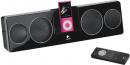
It was about 12 months ago that Logitech introduced the Pure-Fi Anywhere product to the UK. Now there is a new version of this portable compact speaker set for the iPod Pure-Fi Anywhere 2which is entitled, not surprisingly, Pure-Fi Anywhere 2.
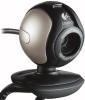
Adding to its range of web cams, Logitech has released the QuickCam Communicate STX aimed at those who are more interested in video communication aspects.
Although web cams were originally developed, and sold as devices for, video conferencing purposes, they were quickly taken up by consumers for more general videoing activities. As a result, extra features, such as face decorating software and avatar personas, were often included as a standard part of the package.
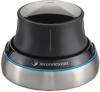
If you're one of those people that have to interact with virtual 3D worlds it's quite possible that
you'll find using a mouse and keyboard either frustrating, limiting or both. A 2D pointing
device just doesn't give enough flexibility to move in a 3D world.
The solution proposed by 3Dconnexion, a division of Logitech best known for their mice and keyboards, is the SpaceNavigator, described as a 3D mouse. We reviewed the SpaceNavigator back in September 2007 ( ). you can read that review here 3Dconnexion have now released a smaller, lighter Navigator - for notebooks. To recap - the SpaceNavigator in a single hand control allows you to : pan, zoom, tilt, spin, roll, move.
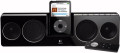
Adding to the range of iPod accessories, not developed by Apple, is a new speaker and recharging unit from Logitech.
click to enlarge The influence of the iPod phenomena continues to spread. The latest example of this trend to come my way is the Pure-Fi Anywhere product. Developed by Logitech, this product is a one-piece, portable speaker set with a centrally positioned docking station for the ubiquitous iPod.
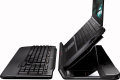
Is it a notebook docking station? Or is it a keyboard? In this case it is the Logitech Alto Cordless product which combines both features.
I have a theory that somewhere in the world, residing in a darken room, is somebody who has been set the task of dreaming up names for new products within the sphere of computing. One of the latest offering to emerge from this room is that of Alto Cordless which brings together a notebook docking station and a wireless keyboard. Developed by Logitech, the Alto Cordless adopts a predominately black covering for both of its main elements.
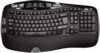
Desktop sets continue to evolve with addition functions and design features to aid the user at both work and play.
There has been a great deal written about RSI (Repetitive Stress Injury) and the effect it can have on those tied to a computer for most of their working life. Even the average computer user is estimated to type more than two million keystrokes in a year.
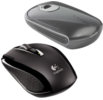
Here I am looking at two mice different in shape and connections. The first from Logitech the VX Nano that has a tiny wireless connector. The second from Kensington that takes shape to the extreme the SlimBlade Trackball mouse.
Logitech VX Nano This is a small (described as for a notebook) mouse, however the real surprise is the transmitter that fits in an USB port it's so small that it fits in the base of the mouse so you just plug it in when you wish to work. So the dimensions the mouse is a maximum of 9x6x3cm with the front edge reducing the 3cm thickness to only a single centimetre.
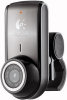
This is an even smaller version of the Quick Cam Pro 9000 that I reviewed last year. It is designed for use with notebooks and the clip is designed to fit on the edge of the screen.
It is 4.5cm tall and the width and depth to the back of the clip are both 4cm. The lens itself is less than a centimetre across. The USB lead is 70cm again designed for use only on notebooks. I stress the notebook angle as even if you have a flat panel the jaw of the grip of the camera is unlikely to stretch to fit as it is only 1.5cm when fully open.
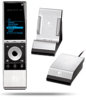
Streaming your music collection to different rooms in your home is the task undertaken by a Logitech product.
Like many others, over time I have built up a large collection of MP3 song titles stored on my computer. I hasten to add that all the various tracks have been legally purchased. While this is a convenient method of storing a music collection, it does place certain restrictions on the ability to listen to the music.
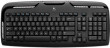
Despite its strong UK presence, some Logitech products are only available overseas.
The Logitech Cordless Desktop LX310 Laser product consists of a keyboard, mouse, USB RF receiver, software CD and the various batteries required to power the mouse and keyboard. As I had been sent the product direct from , I was not too surprised to find that the keyboard layout followed the standard pattern of positioning some of the keys in locations that might cause confusion some users.




Main Menu


