Buy Now...

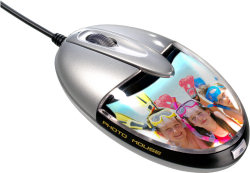
They say that owners grow to look like their pets or should that be the other way round with pets growing to look like their owners. Whichever way it is, maybe there is a link to the concept behind the development of a new mouse from Saitek. This is the appropriately named Photo Mouse which allows you to customise the device by adding a favourite photo whether this is a loved one, pet, special occasion, favourite location or celebrating an achievement.
The mouse is of the standard two button variety with a rubberised wheel. It has been designed to be suitable for both left and right handed users. Featuring 800 dpi optical technology, the mouse connects to the computer via USB. No drivers will be required as you just plug it in and away you go mousing around the desktop and various applications.
Customising the mouse with a suitable photograph is enabled by a detachable, transparent lid that is released by pressing a button at the rear of the mouse. You can then replace the photo in situ with one of your own choosing. This photo will need to fit a specific template of which there is a cut-out version in the mini manual provided with the product.

You also have an option to download a template file from Saitek. This file contains the template outline in various formats including JPG, GIF and Paint Shop Pro X2. However, although these downloaded templates will save the user guide from being cut up, the templates supplied are too large to fit within the area set aside on the mouse. This area limits you to just 60 x 53mm (W x H) and so some resizing of the templates will be required. For experienced users, familiar with their image editor, this should be no problem but those less experiences might struggle a little. I would suggest photocopying or scanning the mini manual version and using the results as a viable alternative. Once in place, with the new device attached to the computer, a white backlight emanating from the mouse will illuminate the image.
The mouse works fine and should require no adjustment on the part of the user. As mentioned earlier, no drivers are needed and the mouse works quite happily with all versions of Windows from 2000 onwards plus Mac OS X. Arriving with a two year manufacturer's guarantee, the Photo Mouse has been priced at £12.99 and should appeal to most members of the family.
http://www.saitek.co.uk/uk/prod/photomouse.htm



 !!
!!





