Reviews by category
Zoom H2 Handy Recorder

Buy Now...

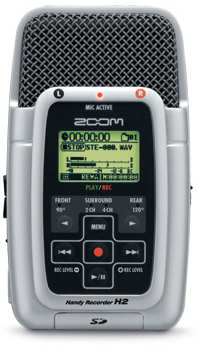
Zoom set up in 1990 to provide sound gear and effect processors to the music industry. The company offers a range of sound mixing desks with recording facilities and a number of recording units.
Until recently, I had used a mini disk recorder for background sound and sound bites for use with my films and video. My MDR disappeared in my son's direction, never to be seen again, so I was in the market for a new recording device.
On researching the market I came across the Zoom H2 Handy Recorder, a solid state recorder with a lot to offer.
The Zoom H2 is a little larger than a packet of cigarettes and looks like an old broadcast microphone. It comes boxed with 512MB SD card, A Desktop Stand, A Mic Clip Adapter, A Wind Screen, Small inearphones, A USB Cable, A Stereo Y Cable and an AC Adapter plus a comprehensive User Manual.
This compact device has four electret microphones in the wire covered cage at the top. These are set up as two stereo pairs one facing the front and the other facing the rear of the unit. The front pair have a 900 angle between them and the rear pair are angled at 1200. The layout allows for a solo or small group recording or a wider band recording to be made. The microphones are normally used as stereo pairs but can be combined to record a four channel sound field that can be converted, in a computer, to Dolby 5.1 surround sound.


The recordings are made on to standard SD cards that slide into a holder in the bottom of the H2. The H2 will accept cards up to 8Gb memory size and these are formatted by the H2 prior to use. Formatting provides one folder for 4 channel recording, 10 folders for stereo recordings and a SYS folder to hold user set parameters. The SD card can be read by a computer and the recordings easily downloaded. The Zoom H2 will record in either .wav format (16 or 24 bit and 44.1, 48, or 96kHz sampling rate) or .mp3 format (64, 128, 192 or 320 kbps)
So what about the sound? Opportunities to record great musical works (without being arrested) are rare. There is a superb recording of choir and organ on one forum which is mind blowing in its clarity. My own experience with electronic keyboard (Yamaha EL-900 organ) is that there is no degradation of sound between the original and playback, using the same speaker and amplifier system. Live recordings are clear and accurate.
The Zoom H2 has no speakers so all the output must be through headphones or a Hi-Fi system. The data format levels exceed those on a CD so more information is available for playback.
The flexibility of the H2 is enhanced with an external microphone input, this can accept powered microphones or, with a phantom power supplied by the H2, normal dynamic mics. I was not happy with using powered microphones as the input level seemed very low, I had better luck with using phantom power and a particularly useful combination was the H2 connected to a lapel (lavalier) microphone. Both internal and external microphones feed through a amplifier and the Gain switch on the side gives High, Medium and Low settings. High creates a lot of hiss so the Medium setting is the most useful. There is a variable electronic "volume" control but this works on the digital recorded signal and has no effect on the analogue input signal. Below the Gain switch is a Line input. All take a 3.5mm stereo jack plug.
The rest of the world is entertained through a Line Out socket controlled by a volume toggle switch. This will feed both Headphones or an input to an amplifier. On the same side of the H2 is a power socket for the AC adapter and an On-Off switch. Power is also supplied from two AA batteries and rechargeables can be used, but an external charger is required.
The main controls are buttons located on the front of the unit underneath a small LCD screen. The settings are controlled through a lengthy menu system but are then stored on the SD card. The first row of buttons selects the microphone pair to be used. The next set, in the form of a cross, are multipurpose, Menu, Record and Playback with Forward (+) and Back(-) on either side.
Recording is as easy a two presses on the Record button. The first press selects record/standby when the level can be set with the +/- buttons and the second press starts the recording. Every recording sets up a new file in the selected Folder. This can be a nuisance because it is not possible to "pause" a recording and restart where the old one left off. The two files need to be added together in post production. The whole process can be monitored through headphones.
Play back again is one button press and the required file can be selected using the +/- buttons which also operate as Fast Forward and Reverse.
Menu selection gives a mass of extras, a low cut filter, two levels of Gain Control, three levels of Compression and three distortion limiters. An auto recording mode can be set to start recording when the sound exceeds a set level and stop again when all goes quiet, a "pre-record" samples the sound and continually stores two seconds of sound to be added to the start of a recording so you don't miss an unexpected start.
Two unusual extras are a programmable Metronome, this will give a count in and keep the beat, and a Tuner. The Tuner samples the sound, selects the nearest note and gives a degree of Sharpness or Flatness. This is based on A=440Hz but can be varied from A=435Hz to A=445Hz special tunings for guitar or bass are also available.
Connection to a computer is via a USB port, the USB not only transfers data but powers the H2. In this mode, the SD card is directly available to the computer as a file system and can be downloaded or recorded to from the computers own music files. I prefer to remove the SD card from the H2 and use the computer's own card reader. The second use of the USB connection is to turn the H2 into a microphone. This can be used for voiceovers or podcasts and gives a high quality input.
So a lot is packed into a small box. I would position the Zoom H2 as being between an Olympus voice recorder and a small recording mixing deck like a Tascam. Sound quality is excellent , versatility less so. It provides a handy, portable recorder that could be used equally for an interview or a concert, a sound effect or a voiceover. It can also be used as an Ipod with CDs or other music sources downloaded in .mp3 format through a computer on to the SD card.
There are downsides. Any handling of the unit when recording, including pressing the record button, will be picked up by the internal microphones, the Mic Clip adapter, which is like a small handle, reduces this. The LCD screen is very small and carries a lot of information so can be difficult to read, there is a backlight which helps but with an increase in battery drain. The H2 is power hungry so a spare set of batteries is essential.
I bought mine through Imuso. The current price is £138.99
| add to del.icio.us | Digg this review |
| StumbleUpon | |
 !!
!!






Comment by Sinan, 15 Feb 2010 0:57
I've purchased my piece over amazon.com (Mistake 1: That was first mistake because after purchasing then i realized it is just shiny cheap plastic, looks like old toys, feels so delicate, buttons are so lame). The day I received it I started testing it. (Mistake 2: Menu is really sucked. I made recordings in different types, wav and mp3, 2 channeled and 4 channeled then plug it into a computer but my computer didn't recognize the H2. I went through manual again and again but no use. (that was third mistake)Later I used my computer sd reader slot. Wavs were fine, but mp3's did not work. Probably codec problem. Must be H2 own codec because I have db converter, K-Lite and Color 7 music editor, 4media converter installed on my pc. (probably fourth mistake). Last and the greatest is I plug it into ac. I used the adapter comes with the machine. Since it drains batteries so quickly I ran out of batteries then though to use ac instead. I plugged my H2 into AC then it died. I doesn't work any more. I used different batteries. I don't think it is a software problem. If so there is no little reset button. I feel stupid and nothing but regret I'm filled with.