Humax PVR-9150T

Buy Now...

click image to enlarge
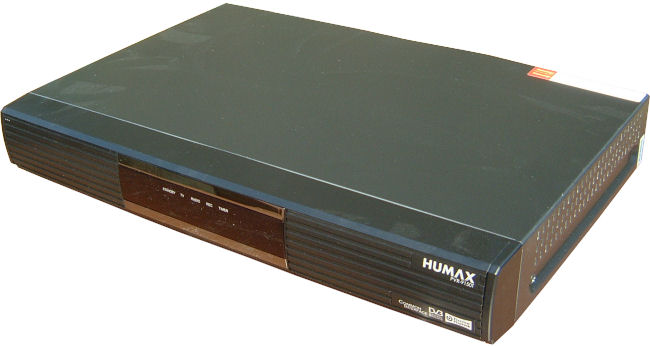
The PVR-9150T joins the established PVR-9200TB we reviewed last year and the PVR-9300 product. We were impressed with the 9200 - it was the products stability and reliability that made it stand out from the crowd as much as price and features.
Connections on the 9150 have been significantly simplified from those of it's older stable-mate and it's clear that this product is aimed at the majority of people that want an easy to use, no fuss video recorder that attaches to their TV with the minimum of hassle.
First of all - appearance. The box is smaller than the earlier model measuring 360 x 50 x 245 mm (WxHxD) and weighs in at 2.9Kg. The size and box styling gives it a modern appearance without taking a lot of room.
The rear of the product is fairly minimalistic containing two SCART sockets (in and out) for connection to a TV and to
an external video recorder, aerial in and a pass-through aerial out for your TV and a separate power-switch allowing
you to completely power down the device without having to pull the plug from the socket.
The only other connector is an RS232C serial port that can be used to upgrade the software. You shouldn't need to use this latter facility - instead software upgrade over-air should be the norm.
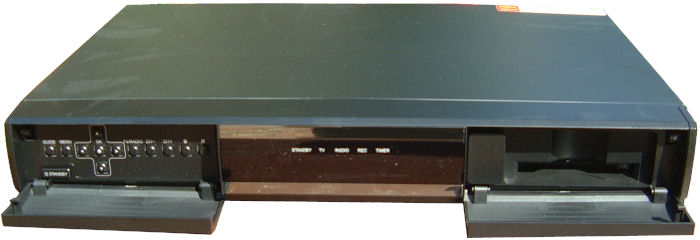
The front panel contains a central row of LED status lamps behind smoked glass coloured perspex sandwiched between two fold-down flaps. The status lights are both clearly labelled and logical and do not on multi-colours to convey information.
To the right of the status area a drop-down panel reveals a slot to accept a "Common Interface" module. Rather than the traditional card slot, the PVR-9150T requires the card be placed into a suitable module that then slots into the chassis. You have to buy (separately) the right kind of module for the Pay-TV channels you want.


The right-hand panel folds down to reveal a set of control buttons that pretty amazingly these days allow you to control virtually all device functions without having to track down that lost remote control.
When in use a small fan provides cooling. This rumbles along at a fairly low pitch but can be easily heard in a quiet room which may be an issue for those with sensitive ears. I didn't find the sound audible while watching TV or recorded video. In standby the unit is completely quiet.
The remote control is on the rather large side, although this does give a plenty of room for buttons. Less
commonly used buttons are hidden under a 'slide-down' cover which rather let the product down - I just
could not get the cover to slide down. In the end, despite being a little worried I was
about to break something, I resorted to a knife to get inside. The cover did get easier - but
still required a lot of fingernail use. I have to say that I'm not convinced of the logic for such a cover -
while some of the buttons were arguably the less useful - one of them was the 'skip commercial advert'
button - surely one of the most common? My temptation if I were to own the product would be simply to remove the cover.
Like most modern PVRs this unit includes two separate Freeview tuners allowing two channels to be recorded simultaneously - or record one, watch another. You can also record two channels and watch a recorded programme. The EPG (Electronic Programme Guide) presented the programme information very well but I found a few things annoying : you could only switch to a channel if the programme you've highlighted is currently on. If you've highlighted any other programme then instead you're given the option to record. The option to record a programme is to my mind oddly marked - instead of being labelled 'record' you select 'schedule'. Schedule to me suggested a 'reminder to watch'.
Many otherwise excellent products are often let down by their software. After problems with certain other products basically being unable to function if you press the wrong buttons in the wrong order I've tried quite hard with the PVR-9150T to make it crash. I'm very pleased to report that I failed.
One of my tests was to completely fill the hard disk (no mean feat and involving recording the whole of BBC1 and ITV1 for a number of days). This led to some very long 'programmes' of around 800 minutes - not a typical test. The PVR worked fine. I particularly liked the ability to place "bookmarks" within those long recordings, presumably to mark interesting scenes, however just as useful for marking the start and end of long programmes!
click image to enlarge
The only software problem I encountered was watching a channel that had been recording for 700 odd minutes and pressing 'rewind' - instead of reversing play direction it jumped back to some time in the first 100 minutes. There didn't seem to be anyway around this.
Pausing live-TV is one of my favourite PVR features - saving many an argument at meal time. A frustration here though is that having paused TV if you accidentally
switch channels you've lost the time-shift period. Generally it's safer to just record the programme permanently - you can watch as you record.
One last niggle is the inability to find out how much disk-space is free when the hard-disk is either recording or playing back. If like most families your disk is almost always virtually full then knowing how much space is available before recording a second programme does become very useful.
Among the very nice features include setting on and off times for the unit - automatically placing it in standby over night. You can also configure the unit to go into 'power saving' mode when in standby. There is no explanation of why this isn't automatic - or whether some features are disabled by using power-saving. Although the technical spec states a standby power consumption of only 1W, you will only get this if you manually switch on power-saving (odd!).
Summary
On the whole this is a very robust PVR that will do everything (and a lot more) that most people need. Ease of use suffers a little and could be thought through somewhat better in places, but generally you'll soon get used to these, even if at first they are a little counter-intuitive. More importantly of course, during the test period the device did not lock up once and did not fail to record programmes that should have been recorded (except when the disk was full!)
The Humax PVR-9150T is available from Amazon for £123.99 including shipping. Given the specification this is a very good price :
http://www.amazon.co.uk/gp/offer-listing/B001EBQGIO?ie=UTF8&tag=gadge0a-21&linkCode=am2&camp=1634
| add to del.icio.us | Digg this review |
| StumbleUpon | |
 !!
!!






Comment by Terry Collett, 15 Apr 2012 19:33