Reviews by category
Brennan JB7 Digital Jukebox

Buy Now...

click to enlarge
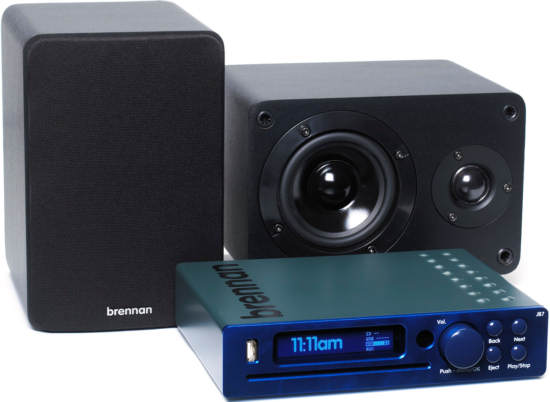
The JB7 from Brennan aims to make music simple - the way it always used to be before the advent of MP3 players, phones that do everything, downloadable music and the proliferation of media formats. While tackling this noble aim it doesn't aim to drop you back into the dark ages - instead it encompasses all that's best in the latest technology, but only so much as is necessary to meet it's core function.
Despite attempts by various organisations to persuade one to download music in a restricted and fragile form at extortionate cost from the Internet, the best way to buy your music remains the humble CD : it has no limitations; you can copy it to tape, to your computer, to your iPod; the quality is significantly better than the lossy compressed version you can download; it does not 'expire'; as long as you look after it - it'll outlive your computer and most other gadgets you own. It's often cheaper per track than a download as well!
Despite those exceptional benefits - there are disadvantages. Lets face it, anyone with more than a few CDs knows what a nightmare it can be to find that elusive track you want for that special event. You know you bought it and it has to be on one of the several hundred CDs you bought.
Introducing the JB7
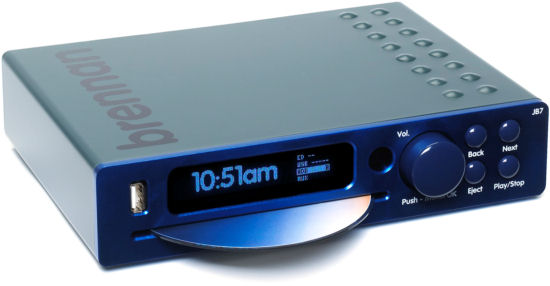
The answer is the JB7. It doesn't do anything you can't do in other ways, but it does it simply. Inside the case it has a hard disk - just like you have in a laptop computer. At the front there is a big bright display, a big dial and four other smaller buttons. There's also, importantly, a slot loading CD player.
The main dial operates somewhat like the tuning dial on a DAB radio. Twist to scroll through menus or tracks - push to select.
Information is displayed on an excellent 180x32mm vacuum fluorescent display that can be seen clearly across a room.


Organising your CD collection
This is what you do. Switch the JB7 on. After a few seconds it's ready to use. Slip your first CD into the slot. The device searches an internal CD database to try and identify the disk you've inserted. The database knows about 2.4 million albums - so unless you have some very unusual tastes should cover most of your collection. You confirm it's choice or over-ride it with your own information and then one more click and the CD is automatically transferred to the internal hard disk. All this can be done while continuing to play music. Transfer speed is at 8x normal CD play time so you can convert an entire CD in about the time it takes to listen to a couple of tracks.
Obviously despite having a big internal CD database - new albums are being published continually. To cover this eventuality without you having to do anything complicated, you'll be able update the database from a special data CD available from Brennan.
Quality
There's nothing plasticy about the JB7. The case is a solid steel/aluminium construction weighing in at 1.6Kg. It can be used either as a component of your existing Hi-Fi (via a line-out connection), but comes with an integrated 60W stereo amplifier. We're testing the unit with Brennan's 50W speakers. The sound quality is excellent.
MP3 is a 'compressed audio format' - that means a track that takes around 80M bytes on CD may be compressed down to 10M bytes or less on an iPod. This compression does not preserve all the quality of the original audio (another reason why buying on CD is better than downloading!). Depending on your ears and the kind of music you like listening to this loss may be audible. By default the JB7 uses 192K bits/second - which for most people will not result in any audible loss of quality while allowing a good number of tracks to be stored. For the sensitive of hearing you can increase this to 320K bits/second or even disable compression entirely - in which case you probably want to buy one of the higher capacity models.
click to enlarge
For my ears the default settings were fine!
Accessing your music
Transferring your CDs to the internal hard disk is quite straightforward, but ultimately pointless if finding the track you want is more difficult than searching your stack of CDs.
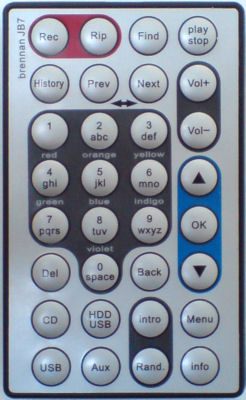
This is a good opportunity to introduce the remote control. This is a 32 button "credit card" remote. This covers all of the functions of the unit, including a few not possible from the buttons on the front of the unit. My one criticism of the remote is that the buttons are somewhat small for those with 'chunkier' fingers, or whose eyesight isn't all it used to be.
The remote includes a numeric keypad that is also lettered in the same way as a mobile phone (the digit '2' represents the letters a, b and c). Using the familiar texting interface you can search for albums and tracks by name. As you enter each letter you are told the number of matches immediately. When you get to a small number simple step through the matches. Pretty easy.
click to enlarge
Backing up your music
The one last thing to mention on the front of the JB7 is a USB 2.0 connector. You can connect various things to this - some more of a gimmick than others. My primary interest was in connecting an external hard-disk, and in the name of simplicity my only interest in this was to make a back up of the internal hard-drive. With the best will in the world a hard disk is a mechanical device and can (and will!) got wrong. After spending many evenings uploading your precious CDs to the JB7 what happens when the device goes wrong?
The JB7 in theory allows you to attach an external USB 2 hard disk. A USB menu allows you to "backup music". There are some limitations. The only supported format is FAT32 (an older format originally popularised by Microsoft). Unfortunately : not all external drives are formatted as FAT32 these days; Windows can't format a drive greater than 32G bytes as FAT32.
While these are not particular limitations for the technically literate - they do fly in the face of simplicity.
Having managed to format our available 80G byte FireStorm hard disk as FAT32 we then found that we still could not backup the internal hard disk to the external drive. Either the transfer stopped within seconds of starting with no error, or a 'No Space' error was displayed.
While this isn't a huge problem for many people - it is something of which people should be aware. The good news with this is that we had a long dialogue with Brennan about the issues and they are working hard and keen to find out why we're having problems. Yes - they know we're writing a review, but you'd be surprised the number of products we review where we report problems and then hear nothing from the company.

click to enlarge
Your portable MP3 player - and other audio equipment
External MP3 players are also partially supported via the external USB port, but this isn't something that seems particularly core to the system. You can transfer the contents of your iPod to the JB7 - but all tracks will be represented in a single album without track information (300+ tracks in our test case). You can also 'play' from the attached device, but again you can't select or search the tracks - start at the beginning and move forward.
My view - this doesn't matter. It's not what the JB7 is aimed at. The JB7 is aimed at making it easy to get your CDs onto a usable, compact system - in that it excels.
The best way to play your iPod through the JB7 is via the line-in connector - that way you can select tracks and use the iPod menu structure.
Summary
The JB7 :
- Has superb sound quality driven by a quality built in amplifier
- Will copy your CDs into a usable format in a way even your grand-mother could cope with
Available with 20, 40 or 80G byte hard disks, the test unit has a 40G byte capacity, and for ease of reviewing came pre-loaded with around 5,000 tracks. During testing we've managed to add an additional 500 or so tracks and there is still around 5G bytes of free disk. For many people this will easily cope with your entire music collection (mine actually fits on less than 20G which may be a little sad).
This system is absolutely excellent at providing a simple way to load and manage your music collection without needing a PC and without requiring you to be a technical guru (or borrow the neighbours son as surrogate technical guru). The built in amplifier coupled with Brennan's own speakers provide beautiful clear quality sound regardless of your listening tastes.
Plug it in. Open a bottle of wine. Sip slowly as you feed it your CD collection. As it devours each album in turn you can listen to the earlier CDs you've already copied.
Backup is a slight problem - but then if the hard disk goes you've still got the CDs - simply open another bottle and relax as you reload them.
The Brennan JB7 is available directly from Brennan on their web-site, where you'll also find a wealth of information about the JB7 :
Pricing starts at £259 for the basic 20G unit with no speakers, rising to £378 for the 80G byte unit with speakers. This isn't particularly cheap but the product is new and, while we only had it for a month or so, appears to be very well made. My hope is that they do not go down the route of reducing price at the cost of quality.
They also have some videos to show you just how easy it is to use.
| add to del.icio.us | Digg this review |
| StumbleUpon | |
 !!
!!






Comment by Larry, 29 Nov 2013 16:31