Reviews by category
Analogue to Digital

Buy Now...

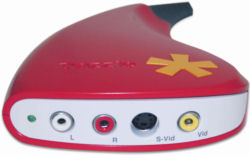
Adding to its range of video capture and archiving devices, Pinnacle has released the Dazzle DVD Recorder (DVC100). This product acts as a conduit between a video source and whatever is your designated DVD destination. Adopting the same tear shape used by the other Dazzle products, the DVC100 is easily identified by its bright red colour. It has a permanently attached USB lead at the narrow end with colour coded sockets for left and right audio plus S-Video and Composite Video In. Unfortunately no connecting leads are provided for either audio or video. For the purpose of this review I opted for a lead with triple sockets on either end that provided the link between left/right audio and Composite Video of the Dazzle unit and my VHS recorder.


However before attaching the device to your computer, via USB 2.0, you need to install the supplied software. Pinnacle supplies two applications, one of which is Instant DVD Recorder. This software allows you to burn your video content direct to DVD media without first copying files to your computer's hard drive. A choice of a wizard-led operation or advanced mode, giving slightly more control over settings, is available with Instant DVD Recorder. Options include selecting the source such as the Dazzle; choose a menu style and the frequency with which items appear; plus decide on the destination which could be your chosen burner or even a folder on your hard drive. You can also set the duration of the recording. A small preview window keeps you apprised of the video as it is burned to the appropriate media.
The second software application is a trial version of Pinnacle Studio 10 which performs similar functionality in transferring content from video tape to digital content but without the direct route to DVD. Personally I prefer the Studio route as it gives you greater control and editing capabilities with regards to cutting frames plus adding title and credit frames to your movie production especially, if like me, you have access to full and later versions of the Pinnacle Studio software.
There are a couple of caveats plus one slight annoying problem I encountered with the software. First you should be aware that the Dazzle device and software have been designed for home movie use and do not handle copy-protected material. Do not expect this device to be the miracle device that can turn damaged videos into highly polished output - you will be disappointed if you do. Just remember that the quality you get from this product will depend upon the state of the video content that you feed the device.
While the software does provide a view of the video being converted and recorded to your hard disk or DVD media, it was noticeable on several, but not all, videos that the picture tended to freeze when fast forward or fast reverse was used. This made it rather difficult when selected different scenes located in various parts of the tape. Other than this the Dazzle DVD Recorder performed well, is easy to use and should be able to convert your video tapes into digital content with facilities to burn menu driven DVDs. The product has been priced at £39.99 although I have seen it listed at around £10 cheaper. Minimum system requirements are Windows XP (SP2) running on a Pentium 2GHz processor with 512MB RAM, 750MB hard disk space, USB 2.0 and DirectX 9.0 plus do not forget those connecting leads.
| add to del.icio.us | Digg this review |
| StumbleUpon | |
 !!
!!






Comment by xReaPzZ, 28 Aug 2010 21:15
Hope that helped u dumbass go buy a PVR there 20 times better than a fucking dazzle ass wipe