Reviews by category
Pure One talkSport DAB Radio


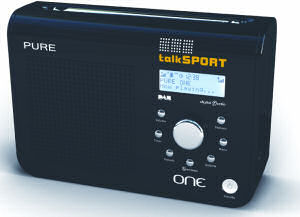
This can be used away from mains either with 6x'C' cell batteries or the Pure ChargePAK that once installed will be automatically charged while run from mains, in previous tests I got around ten hours of use between charges using one.
The dimensions of the Pure TalkSPORT radio are 21x14x6cm and it weights around 1.2kilos with batteries. The left half of the front is a speaker grill the speaker behind it is around 6cm round. The right half has are the controls there are seven silvered buttons in the shape of a 'U' with a large control knob in the centre. To the right and below this is a white standby button. Above this is a three line LCD display (blue on grey) with backlight out and blue on white when it's on.


The top has a eight piece rod aerial that extends to 75cm. There is a finger grip along the back with the battery bay taking the bottom part of the back and the power brick input is to the side of the battery bay. The only other ports are a mini USB (for firmware upgrades) and earbud socket.
Before first switch on extend the rod aerial and connect the power brick then press the standby button, maybe sixty seconds later you will be hearing a radio station. In my case it found 51 DAB stations.
The basic idea is select your function from the seven silvered know and then make adjustments as required from the large central knob. By default it is for increasing/decreasing the volume however you need to press the volume button to return it to that state after using another button.
There is a small twenty page owners manual. I doubt you will need it that much as all the buttons are well labelled. Maybe for the first time to set a preset or for setting a timer. However once you have used the radio for a week give it a read just to see if you have found all the functions and facilities.
You have twenty presets and unlike some other DAB radios you mix the DAB and FM presets so as an example presets one and two could be DAB stations and three to five FM stations and so on. If you are listening to one and press for say preset four it will not only change to that station but automatically switch bands if necessary. For all DAB presets it will state the name of the station on the LED display. However for FM some stations only show as their frequency for example 105.4 in the preset but the station name Magic shows when you tune to it.
The one thing missing is a basic wake up alarm. There is a sleep timer and there is also what is called a 'kitchen timer' that gives say a three hour, sixty minute or even a five minute alarm. I suppose should you set it far enough in advance it could be a wake up alarm but it would need to be set when you are going to sleep. While you need to have it running on mains for the clock time to be kept, however it soon picks up the time (less than five seconds) when you switch on even if you are running on batteries.
One thing that a lot of other DAB radios do not have is Intellitext, a few clicks on the large button for a station that has Intellitext can get the headlines in a range of subjects, a useful extra facility.
Doing my Internet searches found the Pure One talkSport DAB radio at a best price of £45.99 from the first link below. However various other Pure One models in black, white or pink are available at £44.95 from the third link but they are not the talkSPORT version.
| add to del.icio.us | Digg this review |
| StumbleUpon | |
 !!
!!






Comment by Paul Lloyd, 8 Aug 2019 17:42