Reviews by category
Brother MFU MFC 885CW


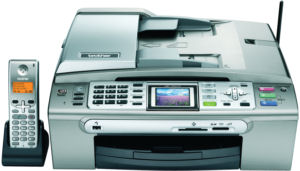
It is 36x39x18cm with the phone and it's socket adding 8cm to the 39cm width. The power lead fits at the rear of the left side well behind the phone so needs to further space, note I said power lead as there is no external power brick. The USB cable fits inside the unit and exits at the rear on the right side.
The installation was not without its problems, first everything is well wrapped (lots of bits of tape) and finding and removing it all takes a while. Once done and the four ink cartridges installed and the rechargeable battery fitted into the phone and this placed in the cradle. I next loaded some paper in the small paper tray that needs to be fully removed as it is double decker so you can store 15x10cm photo paper on a shelf above the main tray.
At this point I started the install of the software and while this was running turned on the printer for it's four minute initialization this completed it wanted to print a sheet to say it was ready. This jammed as did the next three, then it told me there was no yellow cartridge installed. By now the software wanted the USB lead connected. After removing and placing the cartridge in again it was happy the page printed, next the software install completed and a difficult 30 minutes was done and I had 450MB less hard disc space. Just to check all was well I printed the test page from Windows.


Apart from the drivers, it also installs some OCR software and Presto software. A separate install brings you a bonus software package Face Filter that allows you to improve on the original.
The front edge has a total of 35 buttons and also a large TFT screen at 10x4cm. The top of the unit has a page feed and a flat bed scanner. Press a single button on the front Fax, Scan Copy or Photo Capture to get a whole range of choices on the display.
However although this is an MFU it is still likely that most of the work will be done from inside Windows. Because it has a fax it is designed to be left off (it does have a power save mode) but the only way to turn it off is to pull the power lead from the back or from the plug. It also has a built in answering machine should you use a single line and the DECT phone gives good sound quality.
When copying (direct from unit) it takes around 50 seconds for a good colour copy, a black/white copy takes around 40 seconds. I received no jams when copying.
Scanning from both the page feed (also useful for faxing) and the flatbed worked well and by default the output will go to Presto but it is possible to output to other software should you wish. Like most recent software you can choose the quality for the job you want. If you are emailing size (or rather lack of it) could be important.
Printing is where I had most of my problems. There are four modes and all manufacturers use the quickest to quote for speeds. I found in 'fast' mode the paper was snatched and anything but an absolutely smooth sheet was likely to jam. There are two places to remove jammed copies from the second (and perhaps easiest) is by lifting the flatbed. The hardest (and the most likely place) is to remove the back and then try pulling of course this will often result in part of the sheet being left in the unit.
Printing the 200 word document produced 14PPM and the 1500 word spread over four pages 12PPM, neither time is startling and the output is also rather grey. Of course the better quality modes fast printing, normal and fine jam less but are slower.
Printing photo quality on photo paper borderless should be possible, I never managed it even when I double checked the options it still printed with borders. An A4 sheet on plain paper took 75 seconds and over 10 MINUTES for the same sheet on photo paper. Quality was okay but this is just too slow.
So the Brother MFC 885CW is fine if a little slow for copying, fine for faxing and scanning but slow and unreliable for printing unless you only print in better modes (slower) to stop the grab that tends to misfeed the paper. Photo printing is also slow.
Doing my Internet searches found the Brother MFC885CW at a best price of £202.09 from the first link below.
http://www.misco.co.uk/applications/SearchTools/item-details.asp?EdpNo=286539&catid=0&sourceid=2003
http://www.brother.co.uk/g3.cfm/s_page/50670/s_level/36220/s_product/MFC885CWZU1
| add to del.icio.us | Digg this review |
| StumbleUpon | |
 !!
!!






Comment by PeterH, 17 Dec 2008 15:53
The DECT telephone often loses the connection to the base and the only solution is to pull out the plug and then reinsert it. The overall quality of construction is flimsy.
The only advantage of this device is the built in telephone but since this function is not reliable I would not recommend it.